Avena-RS
Avena-RS records sensor data from instrumented pavement test strips and makes it available to people who are not standing next to the road. Each test strip has an edge node: a small Fedora computer in a roadside box with a LabJack T7 data acquisition device wired to the buried sensors. The edge node samples the sensors, keeps a local archive, and connects out to a central NATS server so the data can be watched live and downloaded from anywhere on the network.
This site covers the software in the avena-rs repository: the Rust services that run on each edge node, the configuration that ties an edge node to the central servers, and the webapp used to watch and export data.
How the pieces fit together
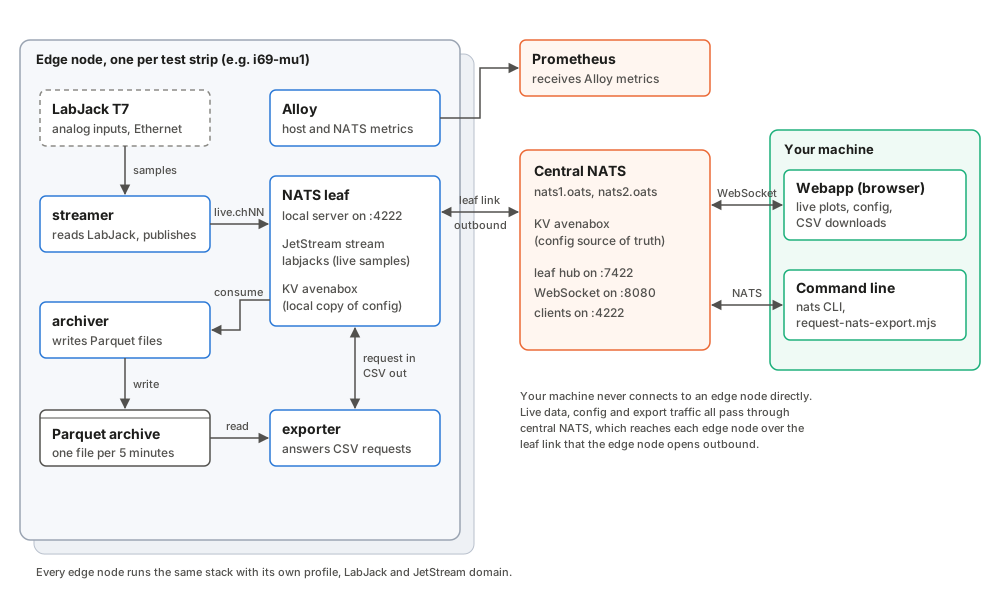
An edge node runs four long-lived programs from this repository and one monitoring agent:
| Program | What it does |
|---|---|
streamer | Opens the LabJack over Ethernet, streams the enabled analog inputs, and publishes the samples to the local NATS server as small FlatBuffer batches, one subject per channel. |
| NATS leaf | A NATS server on the edge node itself. It stores the live samples in a JetStream stream, keeps a local copy of the configuration, and holds one outbound leaf connection to central NATS. |
archiver | Reads the samples back out of JetStream and writes them to compressed Parquet files, one file per channel per five minutes. |
exporter | Waits for export requests that arrive through central NATS, reads the matching Parquet files and streams them back as CSV. |
| Alloy | Collects host, NATS and service health metrics and sends them to central Prometheus. |
The central side is two NATS servers (nats1.oats and nats2.oats) and a
Prometheus server. Your machine talks only to central NATS: the webapp over
WebSocket, command-line tools over the normal NATS port.
How data moves
Live samples. The streamer publishes each batch to a subject such as
avenars.i69.i69-mu1.i69-lj2.live.ch11. The leaf forwards it to central NATS,
and any browser plotting that channel receives it a moment later.
Archive. The same messages are kept in the edge node’s JetStream stream. The archiver consumes them and writes Parquet files. It acknowledges a message only after the file holding its samples has been closed and synced to disk, so if the power fails mid-file the messages are delivered again and nothing is lost.
Configuration. Which channels to record, how fast, how to convert volts to
engineering units, and which noise filters to apply when the data is read are
kept in a JSON document in the central avenabox key-value bucket. The webapp edits it there.
Each streamer mirrors its own key into the local bucket and restarts sampling
when the channels or rates change. The local copy lets an edge
node keep recording through an outage of the central servers.
Exports. The webapp sends an export request to
avenars.<site>.<box>.<source>.export.request. Central NATS routes it over the
leaf link to the right edge node, where the exporter replies with CSV chunks.
The browser acknowledges the chunks as they arrive, which keeps a slow
connection from being flooded.
Why it is built this way
Edge nodes sit on roadside networks that drop out, and they are hard to reach physically. Three decisions follow from that.
The edge node dials out. The leaf connection is opened from the edge node to central NATS, and live data and exports both travel over it. The streamer also opens an ordinary client connection to central NATS to mirror its configuration. Both connections are outbound, so the box needs no public address and no inbound firewall rule.
Data is stored where it is measured. The Parquet archive stays on the edge node, and only the live stream and requested exports cross the network. A long outage delays remote access, but does not lose data.
Configuration has one source of truth. The central key-value bucket is authoritative, and edge nodes hold a mirror. There is no configuration to edit by hand on a box once it is installed.
Repository layout
| Path | Contents |
|---|---|
rust-ljm/ | The Rust services: streamer, archiver, exporter, and the subscriber, recompress and dedupe tools. |
webapp/ | The SvelteKit webapp for live plots, configuration and exports. |
shared/ | Edge node profiles, the renderer that turns a profile into service configuration, container and systemd unit files. |
scripts/ | Installer, status and health-metric scripts, the command-line export client, and the docs build. |
docs/ | This site. |
Where to go next
- Setting up a new edge node: A new edge node.
- Watching data and downloading it: The webapp.
- Looking after a running box: Services on an edge node and Troubleshooting.
- Working on the code: API reference.
API reference
The reference pages are generated from the source code on every build, so they
always match the code on main.
Rust services
Each program in rust-ljm is its own binary, so each has its own reference.
Private items are included, because almost everything in a binary is private
and that is where the interesting code lives.
| Binary | Role |
|---|---|
streamer | LabJack acquisition and NATS publishing |
archiver | JetStream consumer and Parquet writer |
exporter | CSV export worker |
subscriber | Diagnostic live capture to CSV |
recompress | Rewrites old Parquet files in the current format |
dedupe | Removes duplicate samples from archive folders |
Webapp library
The TypeScript modules under webapp/src/lib are documented in the
webapp reference. The Svelte components and pages are
described in Components and How the webapp
works; each also carries a @component comment at the
top of its file.
Setting up a new edge node
This guide takes a freshly installed Fedora machine to a working edge node: the LabJack is streaming, samples reach central NATS, Parquet files are being written, and exports work from the webapp. Every step ends with a check. Do not move on until the check passes; each step depends on the ones before it.
Plan on two to three hours if everything is at hand. The slow parts are installing packages and the first Rust build.
What you need
Hardware. The edge computer (a LattePanda running Fedora on x86-64) with its
large data disk mounted at /extstore, a LabJack T7 on the same Ethernet
network, and a DHCP reservation for the LabJack so its address never changes.
Accounts and credentials. Ask the NATS administrator for two files made for this box. Never reuse another box’s files.
| File | Used by | Purpose |
|---|---|---|
apt.creds | the Rust services and the nats CLI | Client access to local and central NATS |
leaf.creds | the local NATS server | The box’s leaf connection to central NATS |
You also need a Tailscale login for the deployment, since the central servers
(nats1.oats, nats2.oats, prometheus.oats) are only reachable over it.
Values for this box. Decide these before starting, and set them as shell variables so the commands below can be pasted as they are. The examples are for a hypothetical third I-69 box.
export SITE_ID=i69                 # site name, shared by all boxes at the site
export BOX_ID=i69-mu3              # this box; also its hostname
export SOURCE_ID=i69-lj3           # this box's LabJack, as named in NATS
export ASSET_NUMBER=1003           # unique integer, shown in the webapp
export LABJACK_IP=192.168.1.113    # the reserved address of the LabJack
export JS_DOMAIN=edge-$BOX_ID      # the box's JetStream domain
export KV_KEY=$SITE_ID.$BOX_ID.$SOURCE_ID.config
Two rules keep boxes from interfering with each other: BOX_ID, SOURCE_ID,
ASSET_NUMBER and the JetStream domain must be unique across all edge nodes,
and the LabJack serial in the profile must be the serial of the device actually
wired to this box.
The commands run on the edge node as the login user user, unless shown with
sudo.
1. Prepare Fedora
Set the name and time zone, enable the base services, and install the packages the build and the containers need.
sudo hostnamectl set-hostname "$BOX_ID"
sudo timedatectl set-timezone America/New_York
sudo dnf install -y podman jq curl git gcc gcc-c++ make openssl-devel pkg-config rsync
sudo systemctl enable --now NetworkManager chronyd sshd tailscaled
Install Rust with rustup, which puts cargo in ~/.cargo/bin:
curl --proto '=https' --tlsv1.2 -sSf https://sh.rustup.rs | sh -s -- -y
source ~/.cargo/env
Install the nats command-line tool. Download the linux-amd64 RPM from the
natscli releases page and install
it with sudo dnf install ./nats-*.rpm.
Check:
hostname                      # prints the value of $BOX_ID
cargo --version && nats --version && podman --version
2. Join Tailscale and check the central names
Bring the box onto the deployment’s Tailscale network with the approved
hostname and tags. The exact tailscale up flags depend on the network, so copy
them from an existing box (tailscale debug prefs) rather than from memory.
Check: all three central names resolve.
getent hosts nats1.oats nats2.oats prometheus.oats
3. Make sure the clock is synchronized
Every sample timestamp comes from this machine’s clock. A box that is a few seconds off records perfectly good data with the wrong times, and nothing else will warn you about it.
chronyc sources
timedatectl
Check: timedatectl reports System clock synchronized: yes, and
chronyc sources lists at least one server whose Reach column is not 0.
If no source is reachable, look at the server and pool lines in
/etc/chrony.conf. MU1 once ran for weeks 3.3 s fast because its only server
name was misspelled. Keep a pool line as a fallback:
server time.cloudflare.com iburst
pool 2.fedora.pool.ntp.org iburst
Then sudo systemctl restart chronyd and check again.
4. Get the source and prepare storage
Cloning needs read access to the repository on GitHub.
cd /home/user
git clone https://github.com/oats-center/avena-rs.git
mkdir -p /home/user/nats \
         /home/user/avena-rs/rust-ljm/parquet \
         /home/user/avena-rs/rust-ljm/outputs
/home/user/nats holds the local JetStream store and
rust-ljm/parquet holds the archive. Put both on the disk you intend to fill.
Check: the disks are the ones you expect, with room to spare.
df -hT /home/user /extstore
5. Install LJM and confirm the LabJack
The streamer talks to the LabJack through LabJack’s LJM library. Download the
LJM installer for Linux (x86-64) from labjack.com and run
it. It installs libLabJackM.so into the system library path.
Check: the library is visible, the LabJack answers, and it opens as a T7.
ldconfig -p | grep LabJackM
ping -c 3 "$LABJACK_IP"
cd /home/user/avena-rs/rust-ljm
LABJACK_IP=$LABJACK_IP cargo run --example info
The last command prints Device Type: T7 and the IP address. It does not print
the serial number. Read the serial from the label on the T7 (or with LabJack’s
Kipling application) and write it down for the next step. The streamer checks
it every time it connects and refuses a device with a different serial, so a
mistake here shows up immediately at step 10.
6. Write the box profile
Each box is described by one JSON file in shared/edge-boxes/. Everything else
the box needs (service environments, the NATS server config, the initial
LabJack configuration) is generated from it, so this file is the only place a
box’s identity is written down. Start from an existing box:
cd /home/user/avena-rs
cp shared/edge-boxes/i69-mu2.json shared/edge-boxes/$BOX_ID.json
Edit the new file and change these fields. The profile reference describes every field.
| Field | Set to |
|---|---|
box_id | $BOX_ID |
source.id | $SOURCE_ID |
nats.leaf_server_name | $BOX_ID-leaf |
nats.jetstream_domain | $JS_DOMAIN |
nats.kv_key | $KV_KEY |
labjack.name | $SOURCE_ID |
labjack.asset_number | $ASSET_NUMBER |
labjack.ip | $LABJACK_IP |
labjack.serial | the serial from the label |
labjack.sensor_settings | the channels, scan rate and calibrations to record |
Render the generated files into a folder of their own:
./shared/render-edge-config.py \
  --config shared/edge-boxes/$BOX_ID.json \
  --output-dir target/edge-config/$BOX_ID
Check: the renderer prints the box, leaf name, JetStream domain and KV key, and they are this box’s values, not the box you copied from.
jq -r '.env.BOX_ID, .env.JS_DOMAIN, .env.CFG_KEY, .env.LABJACK_IP, .env.LABJACK_SERIAL' \
  target/edge-config/$BOX_ID/streamer.env.json
Commit the new profile to the repository. The generated folder under target/
is never committed; it can always be rendered again.
7. Install the credentials
cd /home/user/avena-rs
install -m 0600 /path/to/apt.creds rust-ljm/apt.creds
sudo install -d -m 0700 /etc/containers/systemd/creds
sudo install -m 0600 /path/to/leaf.creds /etc/containers/systemd/creds/leaf.creds
The two paths are easy to confuse:
rust-ljm/apt.credsis where the installer picks up the client credentials. It copies them to/etc/avena-rs/apt.creds, which is the path the services actually read./etc/containers/systemd/creds/on the host is mounted into the NATS container as/etc/nats/creds/. That is why the profile’snats.leaf_credentials_pathsays/etc/nats/creds/leaf.creds: it is a path inside the container.
8. Start the local NATS server and monitoring
The NATS server, its Prometheus exporter and Alloy run as Podman containers managed by systemd through Quadlet files.
cd /home/user/avena-rs
B=target/edge-config/$BOX_ID
sudo install -m 0644 $B/nats-leaf.conf           /etc/containers/systemd/nats-leaf.conf
sudo install -m 0644 shared/nats-leaf.container   /etc/containers/systemd/nats-leaf.container
sudo install -m 0644 shared/nats-exporter.container /etc/containers/systemd/nats-exporter.container
sudo install -m 0644 shared/config.alloy          /etc/containers/systemd/config.alloy
sudo install -m 0644 $B/alloy.container           /etc/containers/systemd/alloy.container
sudo systemctl daemon-reload
sudo systemctl enable --now nats-leaf nats-exporter alloy
The first start pulls the container images, which takes a minute.
systemctl is-enabled reports these units as generated rather than
enabled. That is normal for Quadlet units.
Check: the server runs with this box’s name and JetStream, the leaf link to central is up, and your credentials work both locally and centrally.
curl -fsS http://127.0.0.1:8222/varz | jq '{server_name, jetstream: (.jetstream != null)}'
curl -fsS http://127.0.0.1:8222/leafz | jq '.leafnodes'      # 1 or more
nats --server nats://127.0.0.1:4222 --creds rust-ljm/apt.creds rtt
nats --server nats://nats1.oats:4222 --creds rust-ljm/apt.creds rtt
server_name must be $BOX_ID-leaf. If the local rtt works but the central
one fails with Authorization Violation, the credentials are not authorized on
the central servers yet; that is fixed on the central side.
9. Seed the LabJack configuration
The streamer and archiver read their recording settings from the key-value
bucket avenabox. The central copy is the one the webapp edits. The edge node
keeps a mirror so it can start and keep recording while central NATS is
unreachable. Seed both from the file rendered for this box (not from
shared/labjack-kv.generated.json, which may belong to another box):
cd /home/user/avena-rs
KV=target/edge-config/$BOX_ID/labjack-kv.generated.json
CREDS=rust-ljm/apt.creds

nats --server nats://nats1.oats:4222 --creds $CREDS kv add avenabox --history=5 || true
nats --server nats://nats1.oats:4222 --creds $CREDS kv put avenabox "$KV_KEY" "$(cat $KV)"

nats --server nats://127.0.0.1:4222 --creds $CREDS --js-domain $JS_DOMAIN kv add avenabox --history=5 || true
nats --server nats://127.0.0.1:4222 --creds $CREDS --js-domain $JS_DOMAIN kv put avenabox "$KV_KEY" "$(cat $KV)"
kv add fails harmlessly when the bucket already exists.
Check: both copies read back as this box’s configuration.
nats --server nats://nats1.oats:4222 --creds $CREDS kv get avenabox "$KV_KEY" --raw | jq '.box_id, .sensor_settings.scan_rate_hz'
nats --server nats://127.0.0.1:4222 --creds $CREDS --js-domain $JS_DOMAIN kv get avenabox "$KV_KEY" --raw | jq '.box_id'
10. Install and start the Rust services
The installer builds the release binaries, installs them with their configuration, and enables the systemd units.
cd /home/user/avena-rs
./scripts/install-edge-services.sh --profile shared/edge-boxes/$BOX_ID.json
It puts the binaries in /usr/local/libexec/avena-rs/, the configuration and
credentials in /etc/avena-rs/, and the units in /etc/systemd/system/. The
services never run anything from rust-ljm/target, so later builds do not
affect a running box until you install them.
Each of the three units also gets the drop-in
/etc/systemd/system/<unit>.service.d/10-nats-ready.conf, which runs
/usr/local/libexec/avena-rs/wait-for-local-nats before the service starts.
The script polls http://127.0.0.1:8222/healthz?js-enabled-only=true once a
second for up to 600 seconds, so after a boot or a nats-leaf restart the
services wait for JetStream instead of failing and restarting. Its result is
in the service log:
journalctl -u avena-archiver -b | grep 'Local NATS JetStream'
# Local NATS JetStream is ready after 4s.
Start the consumers before the producer, so the archiver is attached to the stream before the first sample arrives:
sudo systemctl start avena-archiver avena-exporter
sudo systemctl start avena-streamer
Check: the streamer connected to the right device and is streaming.
journalctl -u avena-streamer -n 20 --no-pager
Look for connected via ETHERNET, serial <your serial> and Streaming started.
Then confirm that samples reach central NATS:
nats --server nats://nats1.oats:4222 --creds rust-ljm/apt.creds \
  sub "avenars.$SITE_ID.$BOX_ID.$SOURCE_ID.live.>" --count 3
Finally, wait for the next five-minute boundary plus a few seconds, and confirm the archiver closed its first files:
find rust-ljm/parquet -name '*.parquet' -mmin -10 | head
journalctl -u avena-archiver -n 20 --no-pager | grep Closed
11. Install the camera (if this box has one)
The roadside camera software lives in the separate edge-code repository and
has its own installer and README. It is independent of the services above, so
it can be installed now or later.
12. Reboot and verify
A box that works until its first power cut is not finished. Install the status command and reboot:
install -m 0755 /home/user/avena-rs/scripts/edge-status.sh /home/user/avena-status
sudo reboot
Wait a minute after it comes back, then run:
/home/user/avena-status
Check: the command exits with status 0. It lists every expected unit as active, shows the NATS server with JetStream enabled and at least one central leaf connection, and shows a recent LabJack file. Also open the box in the webapp and confirm the live plot moves and a short export downloads (see The webapp).
The box is now set up. Services on an edge node describes what is running and how to look after it.
The webapp
The webapp runs in your browser and talks only to central NATS, over WebSocket.
It lists the LabJack configurations in the central avenabox bucket, edits
them, plots live channels, and downloads archived data as CSV. It never
connects to an edge node directly, so it works from anywhere on the Tailscale
network.
Run it
You need Node.js 18 or newer and pnpm.
cd avena-rs/webapp
corepack enable        # provides pnpm, if it is not installed already
pnpm install
pnpm dev
Open the address Vite prints, normally http://localhost:5173.
Connect
On the first page, enter the central WebSocket address and choose a credentials file:
| Setting | Value |
|---|---|
| Server URL | ws://nats1.oats:8080 |
| Credentials | a .creds file allowed to read and write the avenabox bucket and subscribe to the avenars.> subjects |
The address and credentials are kept in the tab’s session storage until you log out or close the tab, and are only used to connect to NATS.
Plot a box
The LabJack page lists every configuration in avenabox, one per edge node.
The Enabled or Disabled badge on each card is the configuration’s
labjack_on_off setting, not a live status.
Opening one shows its live channels. Asset numbers are not guaranteed to be
unique between boxes, so the plot address carries the configuration key:
/labjacks/plots/1001?key=i69.i69-mu1.i69-lj2.config
The plot page shows up to two channels at a time and receives only the ones you select, so selecting a channel again starts an empty plot. Each channel says whether it shows raw volts or calibrated values and in which unit; a calibrated channel also shows its latest raw reading in volts. The unit is the one set with the channel’s calibration in the configuration form; if a channel says “unit not set”, edit the configuration and choose it. A channel with noise filters in its configuration is drawn filtered, with a FILTERED badge; its Filtered / Raw switch shows the unfiltered values instead, without saving anything.
The connection badge reads Connecting, Connected, Reconnecting or Disconnected. When the connection drops, a banner says the page is reconnecting, and the plots carry on by themselves afterwards with a gap for the missing time. If a plot stays empty, check on the command line that samples are arriving at central NATS:
nats --server nats://nats1.oats:4222 --creds apt.creds \
  sub 'avenars.i69.i69-mu1.i69-lj2.live.>' --count 3
Change what a box records
Editing a configuration in the webapp writes the central key. The box’s streamer mirrors the change within a moment and, if the channels, rates or identity changed, restarts sampling with the new settings; the archiver starts a new file when a channel’s calibration changes. Each channel has one calibration, set in the form together with its unit (for example kPa for pressure or µε for a strain gauge); a strain gauge’s calibration can be worked out from its certificate factor, the bridge excitation and the amplifier gain with the form’s bridge helper. Each channel can also have noise filters (spike removal, 10 Hz and 11.9 Hz removal, high- and low-pass); they change only what the plots and exports show, never the archive. The LabJack configuration reference explains each field, and Noise on the I-69 sensor inputs what the filters are for.
Download data
The export dialog starts with the plotted channels and the last two minutes.
Times are to the second in your browser’s time zone, which the dialog names,
and the same range is shown in UTC underneath. If a channel has filters,
“Include filtered values” adds a filtered_value column to the CSV. In Chrome
and Edge you choose where to save before the export starts, and the file is
written as the data arrives; other browsers save it as a download at the end.
Cancel Download stops a running
export and saves nothing; the box may still send a few more chunks before it
notices, for up to about 30 seconds. The request goes through
central NATS to the exporter on that box, which reads its Parquet archive and
streams the rows back as CSV. Large ranges take a while: the edge node’s
uplink is usually the limit.
The same request can be made from the command line, which is handy for scripting and for checking the export path without a browser. See Command-line tools.
For how the webapp is put together, and how to build and host it for others, see How the webapp works and Developing and deploying.
Installing without internet
Some sites have no usable internet during installation. Prepare a kit on another Fedora x86-64 machine before the visit, so every step of the setup guide can run from local files.
| Item | Why |
|---|---|
avena-rs source, including Cargo.lock | The services and profiles |
A vendored Cargo cache (cargo vendor) or release binaries built on the same Fedora version | The first build otherwise downloads crates |
RPMs for the packages in step 1, plus the nats CLI RPM | dnf cannot reach its mirrors |
The rustup offline installer or a copied ~/.rustup and ~/.cargo | Rust toolchain |
| The LabJack LJM installer for Linux | LabJack driver |
podman save archives of every image named in the Quadlet files | The containers otherwise pull images on first start |
apt.creds and leaf.creds for this box, carried separately from the rest | Credentials |
edge-code source, its Python wheels and model, if the box has a camera | Camera software |
On site, load the images with podman load -i <file> before step 8, and the
container units will start from them.
Keep the credentials out of the source archives, and check the checksums of installers, RPMs, binaries and image archives after copying.
Services on an edge node
This page lists what runs on a healthy edge node, what each piece depends on, and where its files live. Use it to tell a real fault from normal behavior.
Units
| Unit | Kind | Normal state | Restarts |
|---|---|---|---|
nats-leaf.service | Podman container (nats-server) | active (running) | always |
nats-exporter.service | Podman container (prometheus-nats-exporter) | active (running) | always |
alloy.service | Podman container (Grafana Alloy) | active (running) | always |
avena-streamer.service | Rust binary | active (running) | on failure, but see below |
avena-archiver.service | Rust binary | active (running) | on failure |
avena-exporter.service | Rust binary | active (running) | on failure |
avena-health-metrics.timer | systemd timer, every 15 s | active (waiting) | |
avena-health-metrics.service | shell script, oneshot | inactive between runs |
The three Rust services need nats-leaf (Requires=), so stopping the NATS
server stops them too. All units start at boot. Before each of them starts,
the drop-in 10-nats-ready.conf runs wait-for-local-nats, which waits up to
600 seconds for local JetStream to report healthy; a service shown as
activating (start-pre) is waiting there. systemctl cat avena-archiver
shows the unit with its drop-in.
Two states look like faults but are not:
avena-health-metrics.serviceis inactive almost all the time. It is a oneshot that the timer runs every 15 seconds. Usesystemctl --failedto see whether a run actually failed.- The container units run their program under
conmon, andpodman.serviceis not running. Podman has no daemon; systemd starts each container directly.
The streamer is deliberately not restarted forever. After five LabJack failures
in a row (STREAMER_MAX_LABJACK_FAILURES) it exits with a success status, so
systemd leaves it stopped instead of hammering a device that is unplugged or
unpowered. Fix the LabJack, then start the service by hand.
Host services the stack relies on: NetworkManager, chronyd (timestamps are
only as good as the clock), sshd and tailscaled (remote access and the
.oats names).
Some boxes also run wattdog.service, which watches the battery and solar
system over Bluetooth. It is installed separately from this repository and is
not covered here.
What each service does at run time
nats-leaf is the box’s own NATS server. It listens on 127.0.0.1:4222 for
the local services, serves monitoring on 127.0.0.1:8222, stores the JetStream
stream labjacks and the local avenabox bucket under /home/user/nats, and
keeps one outbound leaf connection to nats1.oats:7422 or nats2.oats:7422.
JetStream syncs to disk every two minutes (the default), so a power cut can
lose the newest data and a consumer’s progress; the archiver’s checkpoints
below keep the latter from creating duplicates.
streamer mirrors its configuration key from central avenabox into the
local bucket, opens the LabJack at LABJACK_IP, checks it is a T7 with the
expected serial, and streams the enabled channels. Each read becomes one
message per channel on avenars.<site>.<box>.<source>.live.chNN. A
configuration change stops the stream and starts it again with the new
settings. It keeps its sample timeline in step with the system clock by
nudging it at most 1 ms a minute, and logs a summary about once an hour
([clock] Slewed ...). Only a system clock step of 2 s or more moves the
timeline in one jump ([clock] Offset of ... persisted).
- archiver has one durable JetStream consumer per enabled channel. It writes samples into Parquet files that cover aligned five-minute windows (:00 to :05,
- 05 to :10, and so on) and acknowledges the messages only once the file is
closed and synced. While a window is open its file exists only as an empty
.parquet.inprogressplaceholder; the data is written when the window closes. A file is also closed after 60 seconds without data, for example when the streamer stops.
The archiver also keeps a small checkpoint per channel in
rust-ljm/parquet/.archiver-state/: the consumer’s ack floor, saved once a
minute and on shutdown with an fsync. If JetStream later hands a consumer
messages at or below that sequence (it lost the consumer’s progress after a power cut; see
Troubleshooting), the
archiver acknowledges them without writing them again. When a channel’s
subject changes, the existing consumer is left as it is and a consumer named
<old name>-f<hash> is used for the new subject.
exporter listens on avenars.<site>.<box>.<source>.export.request and
answers each request with CSV read from the Parquet archive. It opens no TCP
port in the normal (worker) mode.
Alloy scrapes host metrics, the NATS exporter on port 7777 and the health
textfile, and sends them to prometheus.oats:9090.
avena-health-metrics writes /var/lib/avena-rs/metrics/avena.prom with the
state of each service, the time of the newest JetStream message and of the
newest completed Parquet file, the number of quarantined files, and the leaf
connection count.
Files
| Path | Contents |
|---|---|
/etc/avena-rs/ | Installed profile, one *.env.json per service, and apt.creds |
/usr/local/libexec/avena-rs/ | Installed binaries and service scripts |
/etc/systemd/system/avena-* | The Avena-RS units, and avena-*.service.d/10-nats-ready.conf |
/etc/containers/systemd/ | Quadlet container units, nats-leaf.conf, config.alloy, and creds/leaf.creds |
/home/user/nats/ | The local JetStream store. Never delete it while the box is in service. |
rust-ljm/parquet/asset<NNN>/<YYYY-MM-DD>/ch<NN>/ | The archive, one part-NNNN.parquet per window |
rust-ljm/parquet/.archiver-state/ | Archiver replay checkpoints, one small JSON file per channel. Safe to delete; the guard then starts again from the consumer’s current progress. |
/var/lib/avena-rs/metrics/avena.prom | Health metrics for Alloy |
The source checkout in /home/user/avena-rs is only used to build and
install. Its target/ folders can be deleted at any time; the running
services do not use them.
Ports
| Port | Where | Used by |
|---|---|---|
| 4222/tcp | 127.0.0.1 | local NATS clients |
| 8222/tcp | 127.0.0.1 | NATS monitoring |
| 7777/tcp | host | NATS Prometheus exporter, scraped by Alloy |
| 12345/tcp | 127.0.0.1 | Alloy status |
| 7422/tcp | outbound | leaf connection to central NATS |
| 4222/tcp | outbound | central NATS, for the configuration mirror |
| 9090/tcp | outbound | Prometheus remote write |
Only the NATS exporter binds to all interfaces. Keep it behind the host firewall.
One-command status
scripts/edge-status.sh (installed as /home/user/avena-status) prints the
state of every unit, clock synchronization, the local NATS server and leaf
count, the newest LabJack and camera files, disk space and failed units. It
exits with a non-zero status if any check fails.
Everyday tasks
Commands on this page run on the edge node from /home/user/avena-rs, with
apt.creds available as rust-ljm/apt.creds.
Look at logs
journalctl -u avena-streamer -f
journalctl -u avena-archiver -n 100 --no-pager
journalctl -u avena-exporter --since "1 hour ago"
Stop and start in the right order
Stop the producer first, so no samples arrive while the consumers shut down, and start it last:
sudo systemctl stop avena-streamer
sudo systemctl stop avena-archiver avena-exporter
# ... work ...
sudo systemctl start avena-archiver avena-exporter
sudo systemctl start avena-streamer
Stopping the archiver closes every open file and acknowledges its messages before the unit reports stopped, so a planned stop loses nothing. Stopping the streamer leaves a gap in the data for as long as it is stopped.
To restart the local NATS server as well:
sudo systemctl stop avena-streamer
sudo systemctl stop avena-archiver avena-exporter
sudo systemctl restart nats-leaf
sudo systemctl start avena-archiver avena-exporter
sudo systemctl start avena-streamer
Change channels, sample rate, calibration or filters
Edit the box’s configuration in the webapp. It writes the central key and the
streamer mirrors it. A change to the channels, rates, identity fields,
rotate_secs or the on/off switch restarts sampling. A change to a
calibration does not; the archiver starts a new file for that channel so each
file keeps the calibration it was recorded with. Filters and labels change
nothing on the box. Or from the command line:
KEY=i69.i69-mu1.i69-lj2.config
nats --server nats://nats1.oats:4222 --creds rust-ljm/apt.creds \
  kv get avenabox $KEY --raw > config.json
# edit config.json
nats --server nats://nats1.oats:4222 --creds rust-ljm/apt.creds \
  kv put avenabox $KEY "$(cat config.json)"
journalctl -u avena-streamer -n 20 --no-pager    # look for the restart, if any
Storage grows with the sample rate. At 2 kHz on four channels the archive takes about 0.6 GB a day; at 100 Hz, about 30 MB.
Export data without the webapp
node scripts/request-nats-export.mjs \
  --subject avenars.i69.i69-mu1.i69-lj2.export.request \
  --asset 1001 --channels 8,9,10,11 \
  --start 2026-09-22T12:00:00Z --end 2026-09-22T12:30:00Z \
  --creds rust-ljm/apt.creds --output mu1.csv
This needs the webapp’s node_modules (run pnpm install in webapp/ once).
See Command-line tools for all options.
Install a new build
git pull
./scripts/install-edge-services.sh --profile shared/edge-boxes/$(hostname).json
sudo systemctl restart avena-archiver avena-exporter
sudo systemctl restart avena-streamer
To go back, check out the previous commit and run the same commands.
Update the NATS server configuration
The installer does not touch the NATS server. When the rendered
nats-leaf.conf changes, install it and restart the server with the services
stopped:
./shared/render-edge-config.py --config shared/edge-boxes/$(hostname).json \
  --output-dir target/edge-config/$(hostname)
sudo install -m 0644 target/edge-config/$(hostname)/nats-leaf.conf \
  /etc/containers/systemd/nats-leaf.conf
sudo systemctl stop avena-streamer
sudo systemctl stop avena-archiver avena-exporter
sudo systemctl restart nats-leaf
sudo systemctl start avena-archiver avena-exporter
sudo systemctl start avena-streamer
Recompress old archive files
Files written before the archiver used zstd compression are about ten times
larger than they need to be. recompress rewrites them in place, checking
every value before it replaces a file:
cd rust-ljm && cargo build --release --bin recompress
nice -n 19 ./target/release/recompress /home/user/avena-rs/rust-ljm/parquet --dry-run
nice -n 19 ./target/release/recompress /home/user/avena-rs/rust-ljm/parquet
It can run while the services are up and can be stopped and restarted at any point. See Command-line tools.
Remove duplicate samples
Archives written before the archiver’s replay guard can hold several copies of
the same windows. dedupe rewrites those folders with one copy of each
sample. It leaves today’s and yesterday’s folders alone, so it can run while
the services are up:
cd rust-ljm && cargo build --release --bin dedupe
nice -n 19 ./target/release/dedupe /home/user/avena-rs/rust-ljm/parquet --dry-run
nice -n 19 ./target/release/dedupe /home/user/avena-rs/rust-ljm/parquet
See Command-line tools.
Free disk space
Nothing on the box deletes old data automatically. Before removing anything
from the archive, copy it off the box and check the copy. Never delete
/home/user/nats while the box is in service; it holds the JetStream stream
and the local configuration.
Troubleshooting
Start with /home/user/avena-status. It usually points at the layer that is
broken. The sections below go from the bottom of the stack to the top.
The local NATS server is down
curl http://127.0.0.1:8222/varz fails, and the Rust services are stopped
because they require it.
sudo journalctl -u nats-leaf -n 120 --no-pagerusually says why./home/user/natsmust exist and be writable./etc/containers/systemd/creds/leaf.credsmust exist.- After fixing,
sudo systemctl restart nats-leaf, then start the Rust services in order (see Everyday tasks).
No leaf connection to central
curl -s http://127.0.0.1:8222/leafz | jq .leafnodes prints 0. The box keeps
recording, but nothing reaches central and exports time out.
- Check that
nats1.oatsandnats2.oatsresolve and that Tailscale is up. nc -zv nats1.oats 7422must connect.- If it connects but the leaf does not come up, the leaf credentials are wrong
or not authorized on central; the
nats-leafjournal shows the rejection.
The streamer is stopped
After five LabJack failures in a row the streamer exits on purpose and stays stopped.
journalctl -u avena-streamer -n 120 --no-pager
ping -c 3 <labjack ip>
Common causes: the LabJack lost power or its network link, it came back on a
different address (it needs a DHCP reservation), or a different T7 was
connected and its serial does not match the profile. Fix the cause, then
sudo systemctl start avena-streamer.
The configuration does not update
A change made in the webapp should appear in the streamer log within a few seconds.
- Compare the central and local copies with
nats kv get(central without--js-domain, local with--js-domain edge-<box>). nats --server nats://nats1.oats:4222 --creds rust-ljm/apt.creds rttmust work from the box; the mirror uses a direct client connection.- Search the streamer log for
central_kv_syncerrors.
Live plots do not move
- On the command line, subscribe to the box’s live subjects through central (see The webapp). If messages arrive there, the problem is in the browser: check the configuration key in the plot address.
- If nothing arrives centrally but the streamer is running, check the leaf connection.
Exports fail or return nothing
- The exporter must be running:
systemctl status avena-exporter. - An empty result for a channel means there are no closed Parquet files in that range. The current five-minute window is not exported until it closes.
- “No exporter is listening on …” (in the webapp) or an immediate no-responders error (from other NATS clients) means nothing is subscribed to the export subject: the exporter is down or the box is offline.
Quarantined files appear
On startup the archiver renames any part-NNNN.parquet.inprogress file left by
a crash or power cut to
part-NNNN.parquet.inprogress.unfinished.quarantined-<milliseconds>-<n>. That
is expected after an unclean shutdown. The samples in it are not lost: their messages were never
acknowledged, so JetStream delivers them again once the consumer’s ack_wait
has passed (about 18 minutes) and they are written into a new file. The
quarantined file can be deleted once the new file exists.
The archiver writes old data again
JetStream stores each durable consumer’s progress in
/home/user/nats/jetstream/.../streams/<stream>/obs/<consumer>/o.dat. The
server replaces that file without an fsync, so a power cut can leave it empty. The
consumer then comes back with no progress and, because the archiver’s
consumers deliver the whole stream, every message still in the stream is
delivered again. A corrupt o.dat makes the server drop the consumer (log line
Error adding consumer ... corrupt state file), and the archiver creates it
again, also from the start of the stream.
The archiver protects against this with its checkpoints. After such a restart its log shows, per channel:
[logger] Consumer '...' ack floor 0 is behind the archiver checkpoint 812345 for ...: JetStream lost the consumer's progress. ...
[logger] Channel 08: skipped 812345 already-archived message(s), stream sequences 1..=812345
The skipped messages are acknowledged without writing, so no new files appear
for old windows. A checkpoint is ignored, with a log line, when the stream was
recreated or ends below the checkpoint; every message is then written as
before. Set ARCHIVER_REPLAY_GUARD=off in the archiver’s environment to turn
the guard off, or ARCHIVER_STATE_DIR to keep the checkpoints elsewhere.
Copies written before the guard existed can be removed with
dedupe. Setting sync_interval: always in
nats-leaf.conf would stop the loss itself, but it multiplied the SSD writes
by about 15 on the I-69 boxes, so the checkpoints are relied on instead.
The readings themselves look wrong
The software records whatever voltage arrives at the LabJack input. Two patterns seen in the field point at wiring or power rather than software:
- Several channels sitting at the same voltage, well outside the sensor’s normal range, usually means the inputs are not connected to live sensors.
- A square wave at an exact frequency on the sensor inputs, but not on unused
inputs or the LabJack’s internal ground (
AIN15), is entering through the sensor wiring or its power supply.
Measure at the LabJack terminals before changing any software. Noise on the I-69 sensor inputs lists the patterns found on MU1 and MU2 and which of them the per-channel filters can remove from plots and exports.
LabJack configuration
Each edge node’s recording settings are one JSON document in the NATS key-value
bucket avenabox, under the key <site_id>.<box_id>.<source_id>.config, for
example i69.i69-mu1.i69-lj2.config. The central copy is authoritative; the
streamer mirrors it into the box’s own bucket.
The first copy is generated from the box profile by
render-edge-config.py. After that, change it through the webapp or with
nats kv put, not by editing the profile: the profile is only read again when
the box is set up.
Example
{
  "labjack_name": "i69-lj2",
  "asset_number": 1001,
  "max_channels": 14,
  "site_id": "i69",
  "box_id": "i69-mu1",
  "source_type": "labjack",
  "source_id": "i69-lj2",
  "nats_subject": "avenars",
  "nats_stream": "labjacks",
  "rotate_secs": 300,
  "sensor_settings": {
    "scans_per_read": 100,
    "scan_rate_hz": 100,
    "channels_enabled": [8, 9, 10, 11],
    "gains": 1,
    "data_formats": ["pressure", "pressure", "pressure", "pressure"],
    "measurement_units": ["kPa", "kPa", "kPa", "kPa"],
    "labjack_on_off": true,
    "calibrations": {
      "8": { "type": "linear", "a": 70.25, "b": -9.1068, "unit": "kPa" }
    },
    "filters": {
      "8": { "despike": true, "remove_10hz": true, "remove_11_9hz": true,
             "highpass_hz": 1.0, "lowpass_hz": 40.0 }
    }
  }
}
Top-level fields
| Field | Type | Meaning |
|---|---|---|
labjack_name | string | Name of the LabJack. Used as the source name in subjects when source_id is missing. |
asset_number | integer | Asset number shown in the webapp and used in the archive path (asset<NNN>/). |
max_channels | integer | Number of analog inputs the webapp offers. The streamer does not use it. |
site_id | string | Site name, the first token of every subject. |
box_id | string | Edge node name, the second token. |
source_type | string | Kind of source, labjack. |
source_id | string | Name of this LabJack in subjects, the third token. |
nats_subject | string | Subject root, avenars. |
nats_stream | string | JetStream stream holding the live samples, labjacks. |
rotate_secs | integer | Length of an archive file’s time window, in seconds. Files cover aligned windows, so 300 gives :00 to :05, :05 to :10, and so on. Changing it restarts the stream. |
sensor_settings | object | What to record, below. |
Subjects take the structured form avenars.<site>.<box>.<source>.live.chNN
when nats_subject is avenars or any of site_id, box_id and source_id
is present. Older documents with none of them publish on
<nats_subject>.<asset>.data.chNN; see NATS subjects.
sensor_settings
| Field | Type | Meaning |
|---|---|---|
scans_per_read | integer | Scans the streamer collects per read, and therefore samples per published message on each channel. Older documents call this scan_rate, which is still accepted. |
scan_rate_hz | number | Scans per second, per channel. Older documents call this sampling_rate, which is still accepted. |
channels_enabled | integer list | LabJack analog inputs to stream, by number (AIN<n>). Each becomes one subject and one archive folder. |
gains | integer | Shown and edited by the webapp. The streamer does not use it: every input is read single-ended on the ±10 V range. |
data_formats | string list | What each enabled channel measures, in the same order as channels_enabled. Labels only. |
measurement_units | string list | Unit of each enabled channel after calibration. Labels only. |
labjack_on_off | boolean | false stops streaming until it is set back to true. |
calibrations | object | Conversion from volts to engineering units, keyed by channel number as a string. Optional. |
filters | object | Noise filters for reading the data, keyed by channel number as a string. Optional; see Filters. |
scans_per_read and scan_rate_hz together set how often messages are sent:
100 scans per read at 100 Hz is one message per channel per second. Aim for
about ten messages per channel per second or fewer; more messages mean more
overhead without more data.
Calibrations
Each entry has a type, the formula’s fields, an optional unit (the
calibrated value’s unit, such as kPa or µε) and an optional id, a label
carried into exports. Older configurations name their calibrations with id;
new ones usually leave it out. The archiver stores unit with the calibration
in each Parquet file.
type | Fields | Converts v to |
|---|---|---|
identity | none | v |
linear | a, b | a * v + b |
polynomial | coeffs (list) | coeffs[0] + coeffs[1] * v + coeffs[2] * v^2 + ... |
The streamer publishes and the archiver stores raw volts. Calibration is applied when the data is read: the webapp applies it for plots, and the exporter writes both the raw and the calibrated value to every CSV row. The archiver stores the calibration that was active in each Parquet file’s metadata, and starts a new file when it changes, so old files keep the calibration they were recorded with.
Filters
Each entry switches on noise filters for one channel. They are applied only where
the data is read: the live plot in the webapp and, when asked for, an extra
filtered_value column in exports (see Export protocol).
The streamer and the archiver ignore them, so the archive always keeps the raw
readings, and changing them restarts nothing. What each filter removes, and why,
is in Noise on the I-69 sensor inputs.
| Field | Type | Meaning |
|---|---|---|
despike | boolean | Strip narrow upward spikes: running minimum, then running maximum, over ceil(2.5 ms × rate) samples. Keeps pulses of about 5 ms and longer. Needs a rate above 400 Hz (two or more samples); ignored below. |
remove_10hz | boolean | Subtract the 10 Hz square wave: a template of one 100 ms cycle, aligned on the sample count and learnt from the last 30 s. Needs rate / 10 to be a whole number of samples, 4 or more; ignored otherwise. |
remove_11_9hz | boolean | Subtract the 11.906 Hz square wave the same way, with a template in phase bins of its (fractional) period. Needs at least 4 samples per period. |
highpass_hz | number | High-pass cutoff, Hz: 2nd-order Butterworth. Ignored at or above 0.45 × rate. |
lowpass_hz | number | Low-pass cutoff, Hz: 2nd-order Butterworth. Ignored at or above 0.45 × rate. |
Every field is optional; a missing, false, null or non-positive value turns
that filter off, and a missing map (or channel) means no filtering. They run in
the order of the table. The spike and template stages work on the raw volts, where
the interference adds; the calibration is applied next, and the high-pass and
low-pass filters run on the calibrated values, so a high-passed pressure reading
is centred on 0 kPa rather than on the calibration’s offset.
The live plot uses causal filters, which add no delay except the despike window
(ceil(2.5 ms × rate) − 1 samples, 2 ms at 2 kHz). Exports use the same spike
and template stages and run the high-pass and low-pass filters forward and
backward (zero phase, doubling their order: −6 dB at the cutoff). A webapp from
before this field was added drops it when it saves the configuration.
No calibration presets
Each channel’s calibration lives only inside its box’s configuration. Earlier
versions of the webapp also kept named presets under calibration.<id> keys in
the same bucket. The services never read them, the webapp no longer does either,
and they have been removed.
Box profile
A box profile is one JSON file in shared/edge-boxes/, named after the box
(i69-mu1.json). It is the only place an edge node’s identity is written down.
shared/render-edge-config.py turns it into everything else the box needs:
./shared/render-edge-config.py \
  --config shared/edge-boxes/i69-mu1.json \
  --output-dir target/edge-config/i69-mu1
| Generated file | Installed as | Read by |
|---|---|---|
nats-leaf.conf | /etc/containers/systemd/nats-leaf.conf | the NATS server |
alloy.container | /etc/containers/systemd/alloy.container | systemd (Quadlet) |
streamer.env.json | /etc/avena-rs/streamer.env.json | the streamer |
archiver.env.json | /etc/avena-rs/archiver.env.json | the archiver |
exporter.env.json | /etc/avena-rs/exporter.env.json | the exporter |
labjack-kv.generated.json | the key-value bucket, by hand (setup step 9) | streamer and archiver |
Without --output-dir, the renderer writes into the repository instead
(shared/ and rust-ljm/), overwriting whichever box was rendered last. Always
pass --output-dir. The installer does.
The renderer stops with an error naming the field if a required field is missing or empty.
Top level
| Field | Required | Meaning |
|---|---|---|
site_id | yes | Site name, e.g. i69. First token of subjects and keys. |
box_id | yes | This box, e.g. i69-mu1. Also its hostname. |
source.type | yes | labjack. |
source.id | yes | This box’s LabJack in subjects and keys, e.g. i69-lj2. |
nats
| Field | Required | Meaning |
|---|---|---|
root_subject | yes | Subject root, avenars. |
local_servers | yes | How the services reach the local server: nats://127.0.0.1:4222. |
config_servers | no | Central servers to mirror configuration from, comma-separated: nats://nats1.oats:4222,nats://nats2.oats:4222. Empty turns mirroring off. |
config_jetstream_domain | no | JetStream domain of the central bucket. Empty for the default. |
leaf_server_name | yes | Name of the local server, <box_id>-leaf. Shows up in /varz and on central. |
leaf_listen | yes | Client listen address of the local server, 127.0.0.1:4222. |
monitor_listen | yes | Monitoring listen address, 127.0.0.1:8222. |
jetstream_domain | yes | This box’s JetStream domain, edge-<box_id>. Must be unique. |
jetstream_store_dir | yes | Store directory inside the container, /var/lib/nats/jetstream. On the host it is under /home/user/nats. |
leaf_credentials_path | yes | Leaf credentials inside the container, /etc/nats/creds/leaf.creds. On the host, /etc/containers/systemd/creds/leaf.creds. |
leaf_remotes | yes, at least one | Central leaf endpoints: nats://nats1.oats:7422, nats://nats2.oats:7422. |
stream_max_bytes | no | Size limit of the local stream in bytes, a positive integer. The oldest messages are dropped when it is reached. |
kv_bucket | yes | Configuration bucket, avenabox. |
kv_key | yes | This box’s configuration key, <site_id>.<box_id>.<source_id>.config. |
stream_name | yes | JetStream stream for live samples, labjacks. |
paths
| Field | Required | Meaning |
|---|---|---|
rust_creds_file | yes | Credentials the services use: /etc/avena-rs/apt.creds. |
parquet_dir | yes | Root of the archive. |
output_dir | yes | Written to the streamer’s environment; the streamer does not currently use it. |
exporter_http_url | yes | Written to the streamer’s environment; not used by the current services. |
labjack
| Field | Required | Meaning |
|---|---|---|
name | yes | Name of the LabJack. Usually the same as source.id. |
asset_number | yes | Unique integer shown in the webapp and used in archive paths. |
max_channels | yes | Analog inputs the webapp offers, 14 for a T7. |
ip | yes | The LabJack’s reserved IPv4 address. |
serial | yes | The LabJack’s serial number. The streamer refuses a different device. |
rotate_secs | yes | Archive file window in seconds, normally 300. |
sensor_settings | yes | Initial recording settings. scans_per_read and scan_rate_hz are required and channels_enabled must not be empty. The whole object is copied into the LabJack configuration. |
max_failures | no | Becomes STREAMER_MAX_LABJACK_FAILURES. Default 5. |
retry_delay_secs | no | Becomes STREAMER_LABJACK_RETRY_DELAY_SECS. Default 5. |
identifier, usb_id, open_order | no | Written to the environment but effectively unused: the streamer opens the LabJack by ip, and falls back to identifier only when no IP is set, which the renderer does not allow. |
sensor_settings in the profile only seeds the configuration. Once the box is
running, the copy in the key-value bucket is what counts, and edits belong
there.
Environment variables
The Rust services take their settings from environment variables. On an edge
node you never set these by hand: render-edge-config.py writes them from the
box profile into /etc/avena-rs/<service>.env.json, and
avena-service-run.sh exports them before starting the binary. Relative paths
in NATS_CREDS_FILE, OUTPUT_DIR and PARQUET_DIR are resolved against the
folder holding avena-service-run.sh: /usr/local/libexec/avena-rs on an
installed box, rust-ljm when it is run from a checkout. The profiles use
absolute paths, so this rarely matters.
The tables list what each binary actually reads, with the default the code uses when the variable is unset.
Shared by all services
| Variable | Default | Meaning |
|---|---|---|
NATS_SERVERS | nats://127.0.0.1:4222 | Comma-separated URLs of the local NATS server. |
NATS_CREDS_FILE | apt.creds | Credentials file for that connection. |
JS_DOMAIN | default domain | The box’s JetStream domain, e.g. edge-i69-mu1. Read by the streamer and the archiver; the exporter uses core NATS only. |
streamer
| Variable | Default | Meaning |
|---|---|---|
CFG_BUCKET | avenabox | Local key-value bucket holding the configuration. |
CFG_KEY | unknown-site.macbook.unknown-source.config | Key of this box’s configuration. Always set it. |
CENTRAL_NATS_SERVERS | unset | Central NATS URLs to mirror the configuration from. Mirroring is off when neither this nor CFG_NATS_SERVERS is set. |
CFG_NATS_SERVERS | unset | Fallback for CENTRAL_NATS_SERVERS. This is the one the renderer sets. |
CENTRAL_NATS_CREDS_FILE | NATS_CREDS_FILE | Credentials for the central connection. |
CENTRAL_CFG_BUCKET | CFG_BUCKET | Central bucket to mirror from. |
CENTRAL_CFG_KEY | CFG_KEY | Central key to mirror from. |
CENTRAL_JS_DOMAIN | CFG_JS_DOMAIN | JetStream domain on the central server, if any. |
STREAM_MAX_BYTES | unlimited | Size limit of the JetStream stream, in bytes. When full, the oldest messages are discarded. |
LABJACK_IP | none, required | IPv4 address of the LabJack T7. |
LABJACK_IDENTIFIER | unset | Used instead of LABJACK_IP only if it is an IPv4 address. |
LABJACK_SERIAL | unset | Expected serial number. A device with a different serial is refused. ANY or a non-number turns the check off. |
LABJACK_NAME | unset | Name used in log messages. |
STREAMER_MAX_LABJACK_FAILURES | 5 | Consecutive failures after which the streamer exits and stays stopped. |
STREAMER_LABJACK_RETRY_DELAY_SECS | 5 | Wait before retrying after a failure, in seconds. |
LJM_PATH | unset | Path to libLabJackM.so, if it is not on the library path. |
The streamer takes its identity (site, box, source, channels, rates) from the
configuration document, not from the environment. The renderer also writes
ASSET_NUMBER, SITE_ID, BOX_ID, SOURCE_TYPE, SOURCE_ID, OUTPUT_DIR,
EXPORTER_HTTP_URL, LABJACK_USB_ID and LABJACK_OPEN_ORDER into
streamer.env.json; the streamer does not read them.
archiver
| Variable | Default | Meaning |
|---|---|---|
PARQUET_DIR | parquet | Root of the archive. |
CFG_BUCKET | avenabox | Local key-value bucket holding the configuration. |
CFG_KEY | labjackd.config.macbook | Key of the configuration to follow. Always set it. |
CENTRAL_NATS_SERVERS, CFG_NATS_SERVERS and the other CENTRAL_* variables | as for the streamer | Optional configuration mirror, same behavior as the streamer. |
ARCHIVER_STATE_DIR | .archiver-state under PARQUET_DIR | Where each channel’s replay-guard checkpoint is kept. |
ARCHIVER_REPLAY_GUARD | on | off (or 0, false, no) turns off the guard that skips messages already archived when JetStream loses a consumer’s progress. |
The renderer also writes NATS_SUBJECT, SITE_ID, BOX_ID, SOURCE_TYPE and
SOURCE_ID into archiver.env.json. The archiver does not read them; like the
streamer, it takes its channels and subjects from the configuration document.
exporter
| Variable | Default | Meaning |
|---|---|---|
EXPORTER_MODE | worker | worker answers requests over NATS. direct (or local) serves a WebSocket instead. |
EXPORTER_ADDR | 0.0.0.0:9001 | Listen address in direct mode only. |
PARQUET_DIR | parquet | Root of the archive to read. |
NATS_SUBJECT | avenars | First token of the request subject. |
SITE_ID | unknown-site | Site token of the request subject. |
EXPORT_BOX_ID or BOX_ID | none, required in worker mode | Box token of the request subject. |
SOURCE_ID | unset | Source token of the request subject. |
LABJACK_NAME | unset | Source token when SOURCE_ID is unset. |
ASSET_NUMBER | unset | Source token asset<NNN> when SOURCE_ID and LABJACK_NAME are unset; with none of the three the token is unknown-source. This is the same fallback the streamer and the webapp use. |
SOURCE_TYPE | labjack | Read but currently not used in the subject. |
In worker mode the exporter subscribes to
<NATS_SUBJECT>.<SITE_ID>.<BOX_ID>.<SOURCE_ID>.export.request, so these values
must match the box’s configuration exactly.
subscriber
subscriber is a diagnostic tool and reads its settings from the environment
as well; see Command-line tools.
NATS subjects
All traffic for a LabJack source lives under one prefix built from its identity:
<root>.<site_id>.<box_id>.<source_id>.<purpose>...
The root is avenars. Every token is lowercased, spaces, . and / are
turned into -, and anything other than letters, digits, - and _ is
dropped, so a name can never add a level to the subject or introduce a
wildcard. For site i69, box i69-mu1 and LabJack i69-lj2:
| Subject | Direction | Carries |
|---|---|---|
avenars.i69.i69-mu1.i69-lj2.live.ch11 | streamer to everyone | Samples from channel 11 (AIN11), one FlatBuffer message per read |
avenars.i69.i69-mu1.i69-lj2.live.* | The wildcard captured by the edge node’s JetStream stream labjacks | |
avenars.i69.i69-mu1.i69-lj2.export.request | client to exporter | Export requests |
a client inbox, e.g. _INBOX.… | exporter to client | Export replies |
Channel numbers are zero-padded to two digits: channel 3 is ch03.
Live subjects are plain NATS subjects, forwarded to central NATS over the leaf connection, so anyone with access can subscribe centrally:
nats --server nats://nats1.oats:4222 --creds apt.creds \
  sub 'avenars.i69.i69-mu1.i69-lj2.live.>'
Configuration keys
Configuration is not published on a subject you subscribe to. It lives in the
key-value bucket avenabox under <site_id>.<box_id>.<source_id>.config. Use
nats kv get and nats kv put rather than the bucket’s internal $KV.…
subjects.
Missing identity fields
If a configuration has a structured root but lacks a field, the tokens fall
back to unknown-site and unknown-box. The source token falls back to the
LabJack name and then to asset<NNN>, the same way for live channel subjects,
the stream wildcard, the export subject and the configuration key. An empty
string counts as missing. unknown-source is used only when there is no asset
number either. Setting site_id, box_id and source_id explicitly is still
the clearest choice.
Legacy subjects
Configurations from before the structured layout, with a root other than
avenars and no identity fields, publish on
<root>.<asset>.data.<chNN>, for example avenabox.1456.data.ch11, with the
asset number padded to three digits. They are still read correctly. New
configurations should use the structured layout; it identifies the box without
a separate lookup, and asset numbers are not unique across boxes.
Why one prefix per source
Putting site, box and source in the subject lets NATS permissions and
subscriptions work at any level: avenars.i69.> is a whole site,
avenars.i69.i69-mu1.> one box. It also lets central NATS route an export
request to exactly one edge node without any lookup, because only that node’s
exporter subscribes to its request subject.
Data formats
Live messages
Each message on a live subject is one FlatBuffer Scan from
rust-ljm/src/data.fbs:
namespace sampler;

table Scan {
  first_sample_unix_ns: ulong;   // time of values[0], Unix epoch, nanoseconds
  sample_interval_ns: ulong;     // time between consecutive values, nanoseconds
  actual_scan_rate_hz: double;   // scan rate the LabJack reported, Hz
  sequence: ulong;               // batch counter, starts at 0 when streaming starts
  values: [double];              // raw readings for one channel, volts
}
The time of values[i] is first_sample_unix_ns + i * sample_interval_ns.
The values are raw volts; calibration is applied by whoever reads them.
A message carries one read for one channel, so it holds scans_per_read
values. All channels from the same read share first_sample_unix_ns and
sequence. sequence restarts at 0 every time the stream restarts, for
example after a configuration change; a gap in it means messages were lost.
A value of NaN marks a sample the LabJack skipped. LJM fills lost scans with
a placeholder when its buffer overflows, and the streamer converts the
placeholder to NaN so it cannot be mistaken for a reading.
The generated bindings are committed: rust-ljm/src/data_generated.rs for Rust
and webapp/src/lib/sampler/ for TypeScript. After changing data.fbs,
regenerate both from the repository root:
flatc --rust -o rust-ljm/src rust-ljm/src/data.fbs
flatc --ts --gen-object-api -o webapp/src/lib rust-ljm/src/data.fbs
Timestamps
The LabJack does not timestamp samples. The streamer stamps the first read of a stream with the system clock and counts forward using the sample interval. Because the LabJack’s crystal and the system clock drift apart by a few parts per million, the streamer nudges the timeline toward the system clock by at most 1 ms a minute, and never by more than half a sample interval, so timestamps within a run always increase. Two things can still move timestamps in one jump: the first minute of a run, when the initial anchor is corrected once, and a system clock step of 2 s or more that lasts three minutes. Both are logged. Sort by timestamp rather than relying on file order.
Parquet archive
The archiver writes one file per channel per time window:
<parquet_dir>/
  .archiver-state/
    labjacks/
      avenars.i69.i69-mu1.i69-lj2.live.ch08.json
  asset1001/
    2026-09-23/
      ch08/
        part-0091.parquet
        part-0092.parquet
        part-0093.parquet.inprogress
      ch09/
      ...
asset<NNN>is the asset number, padded to three digits.- The date folder is the UTC date of the samples in the file.
part-NNNNcounts up within a day and channel. The number carries no time information; read the timestamps..parquet.inprogressis the file for the window being recorded. It stays empty on disk until the window closes.*.quarantined-*files are unfinished files set aside after a crash; see Troubleshooting..archiver-state/holds the archiver’s replay-guard checkpoints, described below. It is not part of the data.
Each file holds the samples of one channel for one aligned window of
rotate_secs (normally :00 to :05, :05 to :10 and so on, in UTC). A window can
be split across two files if the archiver restarted during it, and a file can
be shorter than a window at the start or end of recording.
Archives written before the replay guard can hold the same samples more than
once, in extra part files for the same window, because the archiver was fed
the same JetStream messages again. The exporter sends each exact copy once,
and dedupe rewrites such folders (see Command-line
tools).
Schema
| Column | Parquet type | Meaning |
|---|---|---|
timestamp_unix_ns | INT64, required | Sample time, Unix epoch, nanoseconds |
value | DOUBLE, required | Raw reading in volts, NaN for a skipped sample |
Key-value metadata:
| Key | Value |
|---|---|
calibration | The channel’s calibration when the file was written, as JSON, e.g. {"id":null,"type":"linear","a":70.25,"b":-9.1068,"unit":"kPa"}. Older files may carry an id and no unit. |
Encoding
Files written since September 2026 have a single row group, zstd compression,
DELTA_BINARY_PACKED timestamps and dictionary-encoded values. The
timestamps are almost perfectly regular and the values come from a 16-bit
converter, so both compress very well: a five-minute file at 2 kHz is about
0.5 MB instead of about 7 MB. Older files use many 1,000-row groups without
compression; recompress converts them (see Command-line
tools). Readers do not need to care which kind a file is.
Reading the archive
Any Parquet reader works. In Python:
import pyarrow.parquet as pq, json

table = pq.read_table("part-0092.parquet")
calibration = json.loads(pq.ParquetFile("part-0092.parquet").metadata.metadata[b"calibration"])
Replay-guard checkpoints
The archiver keeps one small JSON file per channel under
<parquet_dir>/.archiver-state/<stream>/<subject>.json (or under
ARCHIVER_STATE_DIR):
{
  "stream": "labjacks",
  "stream_created_unix_ns": 1790000000000000000,
  "subject": "avenars.i69.i69-mu1.i69-lj2.live.ch08",
  "archived_through_seq": 812345
}
archived_through_seq is the consumer’s ack floor: every message on that
subject up to this stream sequence is inside a closed, synced Parquet file. The
file is replaced atomically and synced, about once a minute and when the
channel stops. It is trusted only while the stream name, its creation time and
the subject match and the stream has not been rewound below it; see
Troubleshooting.
Deleting the folder is safe: the guard then starts again from the consumer’s
current progress.
Export protocol
The exporter on each edge node answers requests for archived data over NATS.
The webapp uses this protocol, and so does scripts/request-nats-export.mjs.
Anything that can publish and subscribe on NATS can use it.
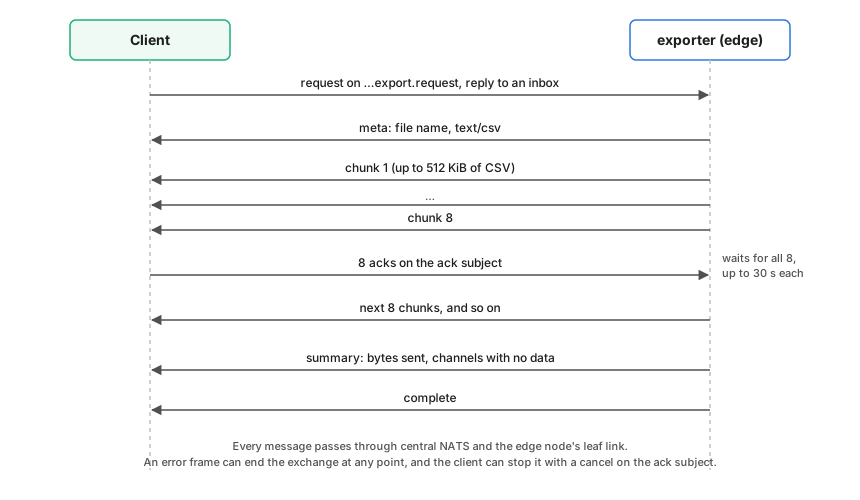
Request
Publish a JSON request to the box’s request subject with a reply inbox:
avenars.<site_id>.<box_id>.<source_id>.export.request
{
  "asset": 1001,
  "channels": [8, 9, 10, 11],
  "start": "2026-09-22T12:00:00Z",
  "end": "2026-09-22T12:30:00Z",
  "format": "csv",
  "download_name": "mu1-noon.csv",
  "ack_subject": "_INBOX.abc123.acks"
}
| Field | Required | Meaning |
|---|---|---|
asset | yes | Asset number, selecting asset<NNN>/ in the archive. |
channels | yes | Channel numbers to export. Duplicates are removed and the list is sorted. |
start, end | yes | RFC 3339 times. Both ends are inclusive; end must not be before start. |
format | no | csv, the default and the only format supported. |
download_name | no | File name reported in the meta frame. Default labjack_asset<NNN>_<start>_<end>.csv. |
ack_subject | no | Subject the client acknowledges chunks on. Strongly recommended; see below. |
filters | no | Noise filters per channel, keyed by channel number as a string, in the shape of the config’s sensor_settings.filters (see LabJack configuration). When a requested channel has any filter on, the CSV gets a filtered_value column; see Filtered values. |
Replies
Replies go to the request’s reply inbox. Each carries the header
Avena-Export-Frame naming its kind:
| Frame | Body | When |
|---|---|---|
meta | {"type":"meta","fileName":"…","contentType":"text/csv"} | First, once the request is accepted |
chunk | raw CSV bytes | One or more, each up to about 512 KiB |
summary | {"type":"summary","bytesSent":N,"missingChannels":[…]} | After the last chunk |
complete | {"type":"complete"} | Last |
error | {"type":"error","message":"…"} | Instead of the rest, or after some chunks if reading fails |
missingChannels lists requested channels for which no rows fell in the
range. The first chunk always starts with the CSV header, so even an export
with no data returns one chunk.
CSV
timestamp,channel,raw_value,calibrated_value,calibration_id
2026-09-22T12:00:00.008+00:00,ch08,3.7219,252.34,tp3505
| Column | Meaning |
|---|---|
timestamp | Sample time in RFC 3339, UTC |
channel | chNN |
raw_value | Volts, as recorded |
calibrated_value | raw_value with the calibration stored in that sample’s file |
calibration_id | The calibration’s id if it has one, otherwise its type: identity, linear or polynomial |
Rows come channel by channel, and within a channel in time order. If the archive holds the same sample more than once (the same timestamp and raw value, left by an archiver that was fed the same messages again), it is sent once. Rows with the same timestamp but different values are all sent.
Filtered values
The exporter does not read the box configuration, so a client that wants filtered
values sends the channels’ filter settings in filters; the webapp copies them
from the configuration when “Include filtered values” is ticked:
"filters": { "8": { "despike": true, "remove_10hz": true, "remove_11_9hz": true,
                    "highpass_hz": 1.0, "lowpass_hz": 100.0 } }
If no requested channel has a filter on (the field is missing, empty, not an object, or every switch is off), the CSV is byte for byte the same as without it. Otherwise the header and every row get a sixth column:
timestamp,channel,raw_value,calibrated_value,calibration_id,filtered_value
2026-09-22T12:00:00.008+00:00,ch08,3.7219,252.34,tp3505,0.8127
| Column | Meaning |
|---|---|
filtered_value | The sample after the channel’s filters, in calibrated units. On a channel without filters it equals calibrated_value. Empty when it cannot be computed: a sample stored as NaN, or a row whose timestamp repeats or precedes the one before it. |
How it is computed, for each filtered channel:
- The exporter also reads 30 s before
start(so the 10 Hz and 11.9 Hz templates have learnt the interference by the first row) and, afterend, twenty time constants of the lowest cutoff (at least 1 s, at most 2 min) plus 0.1 s, so the backward pass has settled. Only rows in the requested range are sent. - The sample interval is the median step of the first 32 rows of each stretch.
Up to 4 missing samples are filled in as
NaNand filtered through; a longer gap, a step off the sample grid or a new rate starts every filter again, templates included (after a gap the stream may be a new run with another phase). - Despike and the templates run as in the live plot; the calibration stored with each row’s file is applied next; the high-pass and low-pass filters run forward and then backward over each stretch (zero phase, −6 dB at the cutoff). Long stretches are processed in blocks of 65,536 samples, each backward pass starting from the settling margin past the block, so memory stays bounded.
- Filters that cannot run at the data’s rate (see LabJack configuration) are skipped.
An exporter from before this field ignores it and sends the five plain columns.
Flow control
Core NATS delivers as fast as the exporter publishes, so a slow client would
fall behind and lose chunks. When the request has an ack_subject, the
exporter waits after every eight chunks until it has received eight messages
on that subject, allowing up to 30 seconds for each. An ack is any message on
that subject other than a cancel (see below); an empty message is enough. A
client should publish one ack per chunk as it stores it. Without
ack_subject, the exporter sends as fast as it can.
Cancel
To stop an export early, publish one cancel message on the same ack_subject:
subject:  <ack_subject>
header:   Avena-Export-Frame: cancel
body:     {"type":"cancel"}
Either part is enough: the exporter treats a message as a cancel if it has
that header, or if its body is JSON with "type":"cancel" (for tools that
cannot set headers). Empty acks are never mistaken for a cancel.
The exporter reads its ack subject before publishing each chunk and while it
waits for acks, so it stops before the next chunk: chunks it had already
published may still arrive, and nothing is sent after it has read the cancel,
not even an error or complete frame. It then closes the ack subscription
and logs [exporter] export cancelled by the client after N chunk(s), M bytes.
Its background reader stops once it finishes the slice it is decoding, usually
within milliseconds and at most about a second for a large merged slice.
The webapp sends a cancel when the user cancels an export, and also when it
gives up for another reason after sending the request (idle timeout, a frame it
cannot parse). It sends none after complete, after an error frame or after
a no-responders status.
Compatibility:
- A client that never sends a cancel works as before.
- An exporter that predates the cancel message counts it as one ack. It then waits for the remaining acks of the current round and stops after its 30-second ack timeout, as it did before, having sent at most eight more chunks. A client should therefore unsubscribe from its reply inbox after cancelling instead of waiting for a final frame.
Errors
The exporter answers with an error frame, and nothing else, when the
request is not valid JSON, channels is empty, a time does not parse, end is
before start, or format is not csv. If nothing is subscribed to the
request subject (the exporter is not running or the box is offline), the NATS
server answers the request’s reply subject with a no-responders status message
(code 503) instead, provided the client connected with headers and no-responders
support, as nats.js does. The dashboard stops the export at once when it sees
it.
Requests are handled concurrently, each on its own task.
Command-line tools
request-nats-export.mjs
Makes one export request through central NATS, exactly as the webapp does, and
saves the CSV. Use it to script downloads or to test the export path without a
browser. It uses the webapp’s NATS libraries, so run pnpm install in
webapp/ once first.
node scripts/request-nats-export.mjs \
  --subject avenars.i69.i69-mu1.i69-lj2.export.request \
  --asset 1001 --channels 8,9,10,11 \
  --start 2026-09-22T12:00:00Z --end 2026-09-22T12:30:00Z \
  --output out/mu1.csv --creds apt.creds
| Option | Required | Meaning |
|---|---|---|
--subject | yes | The box’s export request subject |
--asset | yes | Asset number |
--channels | yes | Comma-separated channel numbers |
--start, --end | yes | RFC 3339 times, inclusive |
--output | yes | CSV file to write; its folder is created if needed |
--servers | no | Comma-separated NATS URLs. Default nats://nats1.oats:4222,nats://nats2.oats:4222 |
--creds | no | Credentials file. Default /etc/avena-rs/apt.creds |
--report | no | Also write the JSON summary to this file |
--timeout-seconds | no | Give up after this long. Default 120; raise it for large exports |
It prints a JSON report with the bytes, chunks and rows received and any channels with no data.
recompress
Rewrites archive files written before September 2026 in the current format (zstd, delta timestamps, one row group). Values do not change, and each file is checked before it replaces the original.
cd rust-ljm
cargo build --release --bin recompress
./target/release/recompress <parquet_root> --dry-run   # report only
./target/release/recompress <parquet_root>
For each part-*.parquet file under the root, it writes a compressed copy next
to it, syncs it, reads it back and compares every timestamp and value bit for
bit, along with the metadata. Only then does it rename the copy over the
original. At any moment every file is either the complete original or the
verified copy, so exports keep working during a run, and a run can be stopped
and started again. It skips files that are already compressed, files with no
rows, unfinished .inprogress files and quarantined files.
It prints progress every 1,000 files and a summary at the end, and exits with
an error if any file failed; a failed file keeps its original. Run it with
nice -n 19 on a box that is recording.
dedupe
Removes duplicate samples from the archive. Before the archiver had its replay
guard, JetStream sometimes fed it the whole stream again, and it wrote the same
windows again into new part files (up to twelve copies on MU1). dedupe
rewrites each affected channel folder so every sample is stored once, in one
file per aligned window (and per calibration, if a folder mixes them), the
layout the archiver writes today. The exporter already skips exact copies, so
this mostly saves disk space and brings each window back to one file.
cd rust-ljm
cargo build --release --bin dedupe
./target/release/dedupe <parquet_root> --dry-run   # report only
./target/release/dedupe <parquet_root>
| Option | Default | Meaning |
|---|---|---|
--dry-run | off | Build and check every new folder, then delete it and keep the original |
--rotate-secs N | 300 | Window length; must match the configuration’s rotate_secs |
Two samples are duplicates only when the timestamp, the value (bit for bit) and the file’s metadata all match. Samples with the same timestamp but different values are all kept and reported as conflicts. One rule crosses metadata: when the same sample is stored both under an identity (or missing) calibration and under a real one, only the calibrated copy is kept, because an identity calibration only means the channel had not been configured yet. A sample stored only under identity is kept.
For each folder it writes the new files to ch<NN>.dedupe-tmp, reads them
back, checks that every row of every original file is present, then swaps the
folders (the original becomes ch<NN>.dedupe-old and is deleted after the
swap). It skips folders for today and yesterday (UTC), which the archiver may
still be writing, folders holding .inprogress or quarantined files, and
folders that are already clean. A run can be stopped and started again: a
leftover staging folder is deleted and an interrupted swap is finished or
rolled back. It prints one line per rewritten folder and a summary, and exits
with an error if any folder failed; a failed folder is left as it was.
subscriber
Captures live samples to CSV without the archiver, for checking a stream by
eye. It subscribes to the live wildcard for one source and appends one file
per channel, labjack_<asset>_<channel>.csv, with the columns
sequence,timestamp,raw_value. It only sees messages published while it runs.
cd rust-ljm
NATS_SUBJECT=avenars SITE_ID=i69 BOX_ID=i69-mu1 SOURCE_ID=i69-lj2 \
ASSET_NUMBER=1001 OUTPUT_DIR=/tmp/capture NATS_CREDS_FILE=apt.creds \
cargo run --release --bin subscriber
Set SITE_ID, BOX_ID and SOURCE_ID. With none of them it falls back to the
legacy wildcard, which matches every asset and names each file after the asset
in its subject.
render-edge-config.py
Turns a box profile into the box’s generated files.
./shared/render-edge-config.py --config shared/edge-boxes/<box>.json \
  --output-dir target/edge-config/<box>
| Option | Default | Meaning |
|---|---|---|
--config | shared/edge-box.config.json | The profile to render |
--output-dir | none | Write the files here. Without it, the files are written into shared/ and rust-ljm/ in the repository. |
--repo-root | . | Repository root that relative paths are resolved against |
install-edge-services.sh
Renders a profile, builds the release binaries, installs them with their configuration and credentials, and enables the systemd units. Run it on the edge node.
./scripts/install-edge-services.sh --profile shared/edge-boxes/<box>.json [--start]
It also installs wait-for-local-nats, the 10-nats-ready.conf drop-in for
each Rust service, the health-metrics timer and Alloy’s container unit. It does
not install nats-leaf.conf; see Everyday
tasks.
--start restarts the services and Alloy after installing. Without it the
units are enabled but left as they were. It expects the client credentials in
rust-ljm/apt.creds.
wait-for-local-nats.sh
Waits until the local NATS server reports JetStream healthy
(http://127.0.0.1:8222/healthz?js-enabled-only=true), polling once a second
for up to 600 seconds. The installer puts it in
/usr/local/libexec/avena-rs/wait-for-local-nats and runs it before each Rust
service through the 10-nats-ready.conf drop-ins (see Services on an edge
node).
edge-status.sh
Prints the state of every unit, clock synchronization, the local NATS server
and its leaf connection, the newest LabJack and camera files, disk space and
failed units. Exit status 0 means every check passed. On a box it is installed
as /home/user/avena-status.
LabJack examples
Small programs in rust-ljm/examples for checking the LabJack without the
services. They read LABJACK_IP (and optionally LABJACK_SERIAL) from the
environment, or from the file named by CONFIG_FILE, or from a
streamer.env.json in the current folder.
| Example | What it does |
|---|---|
info | Opens the device and prints its type, address and connection |
read | Polls the analog inputs and prints their values |
stream | Runs an LJM stream and prints the samples, without NATS |
stop | Stops a stream left running by a crashed process |
cd rust-ljm
LABJACK_IP=192.168.1.111 cargo run --example info
info works while the streamer is running. read and stream do not: the
LabJack runs one stream at a time and refuses analog reads while it streams, so
stop avena-streamer first. stop ends whatever stream is running, including
the streamer’s, so only use it when the streamer is already stopped.
How the webapp works
The webapp is three pages, an error page and six components. Every page talks to central NATS directly from the browser; there is no application server in between.
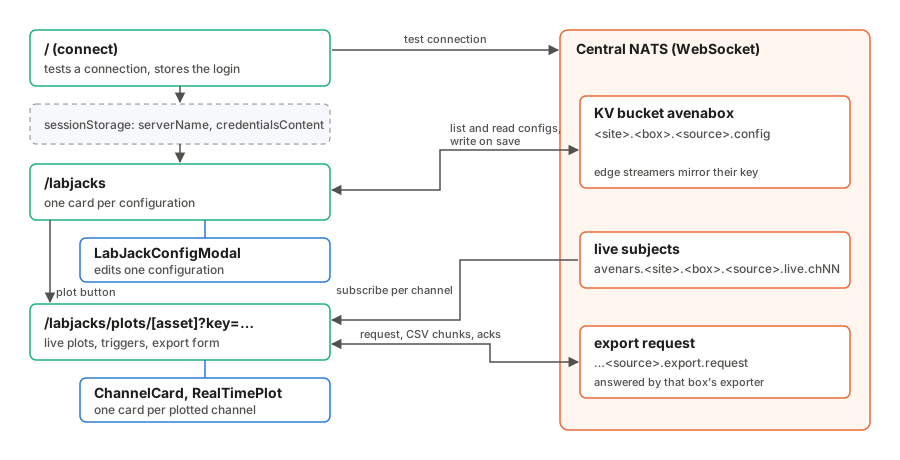
Connecting
The connect page (/) takes the central WebSocket address and a .creds file.
It opens a test connection, closes it, and stores the address and the file’s
text in the tab’s sessionStorage as serverName and credentialsContent.
Each later page reads those two values and opens its own connection. There is
no shared connection object between pages, so a page reload always starts
from a clean connection. A page closes its connection before it retries and
when you leave it, so retrying does not pile up connections.
The credentials file is read when you press Connect, not when you pick it, so a file chosen while the page is still loading is not lost. Pressing Enter or clicking Connect again while a test connection is running does nothing.
connect() in src/lib/nats.svelte.ts accepts a bare host name as well as a
full URL. It builds the ws:// and wss:// variants and tries them in order,
and resolves to null rather than throwing when none of them works, so the
pages show an error message instead of crashing.
The LabJack list
/labjacks lists every key in the avenabox bucket that matches
*.*.*.config and shows one card per configuration. Configurations are read
through normalizeLabJackConfig() in src/lib/labjack-config.ts, which fills
in missing fields and accepts older field names.
If you have not logged in, the page shows only an error with a link to the
connect page. Adding a configuration is disabled until the page is connected.
The Enabled or Disabled badge on a card is the configuration’s
labjack_on_off setting. It says whether the box has been told to stream, not
whether the box is actually running.
Adding or editing a configuration opens LabJackConfigModal, which edits a copy
and returns it. The page writes the result to
<site>.<box>.<source>.config. From there the edge node’s streamer picks the
change up within seconds (see LabJack configuration).
Writes and deletes each open a short-lived connection of their own. Closing the
form with unsaved changes asks first. Delete sits at the bottom of each card,
away from Edit, and asks for confirmation.
Earlier versions also kept named calibration presets under calibration.* in
the same bucket. The webapp no longer reads or writes those keys, and the edge
node never did: each channel’s calibration lives only in its configuration.
Live plots
The plot page is /labjacks/plots/<asset_number>?key=<kv key>. The key names
the configuration to plot. Asset numbers are not unique across boxes, so the
key is what makes the page unambiguous. The page reads that one key, and only
if it is missing or belongs to another asset number does it list every
*.*.*.config key and take the first configuration with that asset number.
You choose up to two channels to plot, and the page subscribes to the live
subjects of those channels only, with plain NATS subscriptions. Subscriptions
follow the selection: deselecting a channel unsubscribes it and drops what it
had, and selecting it again starts an empty plot that fills from that moment.
Messages arrive as FlatBuffer Scans (see Data
formats). Every message is queued
in arrival order until the page next gets to it. The queue is bounded at 5,000
messages per channel; it only fills if the page cannot keep up for a long
time. Then the oldest messages are dropped, the count shows under Data
Statistics, and the plot shows a gap where they were.
Decoding runs on the browser’s animation frames. Each frame the channels take turns, 50 messages at a time, for up to 8 ms; every channel gets at least one turn, and whatever does not fit stays queued, in order, for the next frame. The decoded buffers are copied into the page’s state, and so redrawn, at most about 30 times a second. A browser runs no animation frames in a background tab, so there a 1 s timer does the decoding instead, and the plot catches up when you come back.
Each sample gets its time from the Scan (first sample time plus its index
times the interval), and the channel’s calibration is applied. Missing samples,
and missing time between messages, become gaps in the line rather than being
joined across; repeated or late messages are skipped; and if the timeline jumps
backward (a clock step or a new sampling run) the buffer starts again. The code
for all of this is in src/lib/plot/, with unit tests.
The page keeps one state object per channel (ChannelView in
src/lib/plot/channel-view.svelte.ts): its mode, axis and trigger settings, the
trigger capture, the live buffer and the snapshot the plot draws. The layout is
split into components: ChannelCard (header badges, Mode & Axis, Trigger
Settings and the plot), StatsPanel (Data Statistics), ExportDialog and
ConnectionBanner. The page itself loads the configuration, owns the NATS
connection, the subscriptions and the decode loop, and runs exports.
Decoding has one quirk worth knowing. The browser can hand over a message as a
slice of a larger buffer that does not start on an 8-byte boundary, and the
generated FlatBuffers code cannot create a Float64Array view on it.
FlatBufferParser copies such a slice to a fresh buffer and reads the values
one at a time, so a missing value comes through as a gap.
Units and calibration
Each channel’s calibration carries the unit it converts to, for example
{"type":"linear","a":2.0,"b":-1.0,"unit":"kPa"}. The unit is worked out by
resolveCalibrationUnit() in src/lib/calibration.ts and used for the axis
title, Latest, the y limits and the trigger threshold. Each channel header
shows a tag saying what the plotted values are:
raw voltswhen the channel has no calibration (identity). The values are volts; a configuration from before calibrations had units that still names another unit for the channel gets a warning.calibrated → <unit>when it has one. The values are in the calibration’s unit.
A configuration saved before calibrations had units has no unit in the
calibration. The page then uses the channel’s measurement_units entry, unless
it is V, which was the value filled in when nobody chose a unit. Such a
channel shows calibrated: <type> → unit not set in yellow with a line asking
you to set the unit in the configuration; saving the configuration from the
form fixes it for good.
A calibrated plot also shows a Raw badge with the latest reading in volts before calibration, which is handy for checking a sensor against its data sheet.
Noise filters
A channel with filters in its configuration (see
LabJack configuration) is filtered on the
way into its buffer by src/lib/plot/live-filter.ts: spikes and the 10 Hz and
11.9 Hz square waves are removed from the raw volts, the calibration is applied,
then the causal high-pass and low-pass filters run. Each point keeps both
values; a Filtered / Raw switch on the channel card chooses which one is drawn
and triggered on, without saving anything, and the plot shows a FILTERED badge
while filtered values are drawn. The despike window holds back the newest
ceil(2.5 ms × rate) − 1 samples (2 ms at 2 kHz), so the trace ends that much
before the newest sample; every sample is still drawn once, in order. The
filters add about 0.3 µs of work per sample. Filters that cannot run at the
channel’s rate are named under the card’s header.
Status and connection
The connection badge under Data Statistics follows the NATS connection’s own status: Connecting, Connected, Reconnecting or Disconnected. While the client is reconnecting, a yellow banner says so; the plots carry on by themselves once it is back, and the missing time shows as a gap. If the connection closes for good, a red banner gives the reason and a Reconnect button.
When the page cannot load at all, the error message comes with the button that can help: Retry for a failed connection or a missing configuration, and Log in when there are no saved credentials. An asset number in the address that is not a number gets the app’s “not found” page, with a link back to the LabJack list. Back returns to the LabJack list.
Modes and axes
Each channel runs in one of three modes. Free Run plots continuously. Trigger Normal and Trigger Single watch for the calibrated value to cross a level, then freeze a window around the crossing so a single event can be inspected. Normal re-arms once the post-trigger window has passed; Single keeps its first capture until you press Re-arm. The capture is drawn inside the plot area with the time axis titled “Time from trigger”.
Turning Auto Y-Scale off keeps the plot where it is: Y Min and Y Max start at the range the plot was showing, rounded to a few significant digits, instead of -1 and 1.
In a trigger mode the trigger level is drawn as a dashed line and labelled once, as “Trig level”, in the margin above the plot. The time axis aims for about one tick per 70 pixels; on a narrow screen it places them closer, as long as the labels do not overlap, so a phone still shows several ticks rather than only the two ends.
The Y limits, X window and trigger level accept any valid number, zero
included. An invalid axis value (Y Min not below Y Max, an X window of 0, text
that is not a number) is put back to the previous value and a short message
under the inputs says why. An invalid trigger level, or a post-trigger window
under 0.01 s, is put back without a message. Drawing is done by RealTimePlot (see Components).
Exports
The export dialog on the plot page opens with the plotted channels ticked and
the last two minutes filled in. Times are to the second, in the browser’s time
zone, which the dialog names; under the times it shows the same range in UTC,
which is what the request carries. It builds an export request and hands it to
downloadExportViaNats() in src/lib/exporter.ts, which implements the client
side of the export protocol. It publishes the
request with a reply inbox and an ack subject, acknowledges every chunk as it
arrives, and finishes when the complete frame arrives. If no exporter is
listening (the box is offline), the NATS server says so straight away and the
export fails with “No exporter is listening on …”. If no message arrives for
ten minutes, it gives up.
When any channel has filters in the configuration, the dialog offers “Include
filtered values”, ticked to begin with. Ticked, the request carries the
configuration’s filters, and when an exported channel has any, the CSV gets a
filtered_value column, computed on the box with zero-phase filters (see
Filtered values). Raw and
calibrated values are exported either way.
Each export runs on a NATS connection of its own, opened with the saved credentials when you press Start Download and closed when the export completes, fails or is cancelled. Reloading the configuration, Retry, Reconnect or a lost live connection therefore do not cut a running export, and the dialog stays open through them. Leaving the page cancels the export.
Where the browser has a save dialog (Chrome, Edge and other Chromium browsers),
Start Download first asks where to save the file, offering the LabJack’s name
(or the exporter’s default name), and then writes each chunk to that file as it
arrives, before acknowledging it: the page passes the file write as the onChunk
hook of downloadExportViaNats, which awaits it before each ack and keeps no
other copy of the export, so a slow disk slows the exporter down instead of
filling memory. Closing the save dialog without choosing a file starts no export.
Firefox and Safari have no such dialog; there the chunks are collected (folded
into Blob parts every 8 MiB) and saved as a normal download when the export
completes.
Cancel Download stops a running export: the page stops reading and
acknowledging chunks, releases the reply subscription, closes the export’s
connection and saves nothing. A partly written file is discarded; if you chose
to replace an existing file, that file is left as it was. The
webapp also sends a cancel message on the export’s ack subject, and the edge
exporter stops before its next chunk. An older exporter that doesn’t know the
message stops when its acknowledgements time out, after up to eight more chunks
and about 30 s.
Current limitations
These are known and worth fixing, but none of them affects recorded data:
- A plot can show gaps after a long stall. If the page falls more than 5,000 messages behind on a channel, the oldest are dropped and counted, and the plot shows a gap. A channel that is not selected is not received at all, so selecting it again starts an empty plot. The archive and exports have every sample.
- Firefox and Safari keep the whole export until it finishes. Without a save dialog, the chunks are folded into Blob parts every 8 MiB and kept in the browser’s Blob storage until the export completes, then saved. Little sits in JavaScript memory, but split very long ranges into several downloads there.
- The credentials sit in
sessionStorageas plain text for as long as the tab is open. Log out or close the tab on shared machines.
Components
The webapp’s components live in src/lib/components/. None talks to NATS: the
pages load and save data, and the components display and edit it. That keeps the NATS
code in one place per page and makes the components easy to reason about.
RealTimePlot
src/lib/components/RealTimePlot.svelte draws one channel as a line on a
<canvas>. The plot page subscribes to the channel, applies the calibration,
and passes the samples in.
The time axis puts 0 at the newest sample in continuous mode and at the trigger in frozen mode. Its ticks fall on round steps (1, 2 or 5 times a power of ten) counted from 0, in seconds or milliseconds, and the title says which: “Time (s)”, or “Time from trigger (s)” for a capture. Ticks are about 70 pixels apart; on a narrow plot they move closer, down to what the labels need, so at least a few show without overlapping. The value axis is titled “Value (unit)”, and the tick labels are kept clear of the title.
Continuous mode shows the last timeWindow seconds with the newest sample
at the right. The right edge is the newest sample’s own time, not the browser
clock, so a slow link does not leave a blank strip at the edge.
Frozen mode is used after a trigger fires. It shows the samples from
frozenPreWindowSec before to frozenPostWindowSec after the trigger, with
the trigger at 0 s, and holds still so the event can be inspected. A badge
reads COLLECTING while the post-trigger samples are still arriving, then
FROZEN.
Drawing is batched to one redraw per animation frame. Each frame keeps only the samples inside the window and reduces them to one minimum and one maximum per pixel column. At 2 kHz a ten-second window holds 20,000 samples for a plot a thousand pixels wide, so drawing every sample would be slow, and keeping the minimum and maximum (rather than averaging) means a one-sample spike is still visible. The line breaks wherever a sample is missing or the stream has a gap, so a gap is never drawn over. With autoscale on, the y axis snaps to round 1, 2 or 5 steps, and in continuous mode it only widens, so the scale does not jump with every frame.
Under the canvas the plot shows:
- Data Points: the samples inside the visible window, not everything held in memory.
- t=0 Src: the source clock of the sample at 0.
- Lag: how long that sample took to reach the browser. It is hidden while a trigger capture is held, since a held capture is not live.
- Latest: the latest value, in
unit. - Raw: when
calibratedis set, the latest reading in volts before calibration.
| Prop | Type | Default | Meaning |
|---|---|---|---|
data | DataPoint[] | Live samples. timestamp is Unix epoch milliseconds; the optional sourceTimestamp and receivedAt (also epoch ms) feed the clock and lag badges. | |
unit | string | Unit label for the axis, threshold and badges. The plot page passes V for an uncalibrated channel and the calibration’s unit for a calibrated one. | |
calibrated | boolean | false | The values are calibrated; shows the Raw badge. data points then carry the reading before calibration in raw. |
timeWindow | number | Width of the continuous window, seconds | |
mode | 'continuous' | 'frozen' | Which mode to draw | |
isTriggered | boolean | Whether a trigger has fired | |
triggerTime | number | Trigger time, epoch ms; 0 for none | |
frozenData | DataPoint[] | Samples around the trigger, for frozen mode | |
frozenPreWindowSec | number | timeWindow | Seconds shown before the trigger |
frozenPostWindowSec | number | timeWindow | Seconds shown after the trigger |
frozenCollecting | boolean | false | Show COLLECTING instead of FROZEN |
showTriggerThreshold | boolean | false | Draw the trigger level line, and a “Trig level” label above the plot |
triggerThreshold | number | Trigger level, in unit | |
prebuffering | boolean | false | Show the PREBUFFERING badge |
yAutoScale | boolean | true | Fit the y axis to the data |
yMin, yMax | number | -1, 1 | Fixed y limits when autoscale is off |
invertX, invertY | boolean | false | Mirror an axis |
tag | string | "" | Badge naming what is plotted; the channel card passes FILTERED while filtered values are drawn |
The component emits no events. It exports one function,
getDisplayedYRange(), which returns the y range of the last drawn frame; the
channel card uses it to start Y Min and Y Max from what is on screen when Auto
Y-Scale is turned off.
Plot page components
The plot page is split into four components. All of them only display and edit state the page owns.
ChannelCardshows one plotted channel: the header with the data format, the unit tag, the trigger state and, for a channel with filters, the Filtered / Raw switch and a line naming the filters (and any that cannot run at the channel’s rate), the Mode & Axis panel, the Trigger Settings panel in the trigger modes, and itsRealTimePlot. Props:view(the channel’sChannelView),dataFormat,unitInfoandonchange, called after a change that alters what the plot shows.StatsPanelis the Data Statistics card. Props:config,assetNumber,channels(the plotted ones),viewsandconnectionState.ExportDialogis the Export Historical Data form. Props:channels,selected, bindablestartandend,error,warning,exporting,progress,total,filteredChannels(channels with filters; the “Include filtered values” box shows when there are any), bindableincludeFiltered, and the callbacksontoggle,onsubmitandonclose.ConnectionBanneris the yellow Reconnecting or red Disconnected banner. Props:state,reasonandonreconnect.
LabJackConfigModal
src/lib/components/LabJackConfigModal.svelte is the form for adding or
editing one LabJack configuration. It edits a
copy of the document and hands the result to onSave; the LabJack list page
writes it to the avenabox bucket. When adding, the page builds the key from
site_id, box_id and source_id; when editing, it keeps the existing key.
An empty source falls back to the LabJack name and then to asset<NNN>, the
same order the live and export subjects use.
The form covers every field of the document: the identity fields, the subject
root and stream, rotate_secs, and under sensor_settings the scan rate,
scans per read, gain, on/off switch, enabled channels, and for each enabled
channel its sensor type, calibration, unit and noise filters. Saving validates
the whole form first;
while adding, a name or asset number already used by another configuration
is flagged as you type. Escape, the close button, Cancel or a click outside
the form closes it without saving; if anything was changed, it asks first.
| Prop | Type | Meaning |
|---|---|---|
config | LabJackConfig | The document to edit, or defaults for a new one. Copied once when the form opens. |
isAddingNew | boolean | Adding a new LabJack: turns on the duplicate checks and changes the titles |
existingLabJacks | Map<string, LabJackConfig> | All loaded configurations by key, for the duplicate checks |
onSave | (config) => void | Called with the edited document once it validates |
onClose | () => void | Called to close the form |
Channel calibration
Each channel has exactly one calibration, edited in place and saved with the rest of the form. There are no named presets and nothing to name.
- Sensor type (stored in
data_formats): Voltage, Strain gauge, Pressure, Temperature, Current or Resistance. It decides which units are offered. - Calibration: None (raw volts), Linear (
a·x + b) or Polynomial (c0 + c1·x + c2·x² …), wherexis the raw reading in volts. - Unit: V for None. A linear or polynomial calibration must have a unit; switching to one picks the sensor type’s first unit (µε for a strain gauge, kPa for pressure). Strain gauges offer µε, mV/V and V; pressure kPa, Pa, bar and PSI.
The card header sums the channel up: sensor type, unit, the formula and what a
raw reading of 1.000 V becomes, for example
y = 481.26·x + 1058.722 · raw 1.000 V → 1539.98 µε.
For a strain gauge with a linear calibration you can type a and b or use
the bridge helper. It takes the gauge’s calibration factor from its
certificate (µε per mV/V, for example 481.26 for SG194 or 705.47 for SG159),
the bridge excitation in volts, the amplifier gain (may be negative) and,
optionally, the raw reading at rest, and computes
µε = factor × 1000 × (raw − zero) / (excitation × gain)
a  = factor × 1000 / (excitation × gain)
b  = −a × zero
It shows a, b and the 1 V preview before you apply them. What is stored is
a plain linear calibration with unit µε; the helper’s inputs are not saved.
What the form saves for a channel, by sensor type:
{"type": "identity", "unit": "V"}
{"type": "linear", "a": 481.26, "b": 1058.722, "unit": "µε"}
{"type": "linear", "a": 250.0, "b": -125.0, "unit": "kPa"}
{"type": "polynomial", "coeffs": [0.5, 100.0, 0.2], "unit": "°C"}
On save the calibration’s unit is also written to the channel’s
measurement_units entry, and a calibrated channel’s data_formats entry is
set to a sensor type that offers the unit, so older readers see the same
labels. An id from an older configuration is kept until the formula is
changed; the form never asks for one.
Configurations saved before calibrations had units still open: a calibration
without unit takes the channel’s measurement_units entry unless it is V.
If it is V the unit box is empty and yellow, and the form will not save until a
unit is chosen. The calibration.* preset keys that earlier versions wrote are
no longer read.
Channel filters
Under each channel’s calibration is a Filters box: Remove spikes, Remove 10 Hz
and Remove 11.9 Hz switches, and High-pass and Low-pass cutoffs in Hz (blank
turns one off). They are saved in sensor_settings.filters (see LabJack
configuration). The box names the filters
that cannot run at the configured scan rate, and how far behind the live plot
runs because of the despike window. A channel with every filter off has no
entry, and a configuration with no filters has no filters field. Turning a
channel off drops its filters.
Developing and deploying
The webapp is a SvelteKit 2 application written in TypeScript with Svelte 5,
styled with Tailwind CSS and daisyUI. It talks to NATS from the browser with
the @nats-io WebSocket client and decodes live messages with the
flatbuffers runtime. It has no backend of its own: every piece of data comes
from central NATS.
Working on it
You need Node.js 18 or newer and pnpm.
cd webapp
pnpm install
pnpm dev            # http://localhost:5173, reloads on save
pnpm dev --host 0.0.0.0 makes the dev server reachable from other machines
on the network.
| Path | Contents |
|---|---|
src/routes/+page.svelte | Connect page: server address and credentials |
src/routes/labjacks/+page.svelte | List of LabJack configurations |
src/routes/labjacks/plots/[asset_number]/+page.svelte | Live plots and export for one configuration |
src/lib/components/ | RealTimePlot, LabJackConfigModal and the plot page’s ChannelCard, StatsPanel, ExportDialog and ConnectionBanner |
src/lib/nats.svelte.ts | Connecting to NATS and reading and writing the key-value bucket |
src/lib/subjects.ts | Subject names, matching rust-ljm/src/subjects.rs |
src/lib/flatbuffer-parser.ts | Decoding live Scan messages |
src/lib/calibration.ts | Volts to engineering units, matching rust-ljm/src/calibration.rs |
src/lib/labjack-config.ts | LabJack configuration types and filling in missing fields |
src/lib/filter-settings.ts, src/lib/filters.ts | Per-channel noise filter settings and the filter pipeline, matching rust-ljm/src/filters.rs |
src/lib/plot/ | The live plot’s data path, per-channel state, trigger logic, drawing helpers, and the export form, connection and file saving |
src/lib/exporter.ts | The client side of the export protocol |
src/lib/sampler/ | FlatBuffers code generated from rust-ljm/src/data.fbs; do not edit |
subjects.ts, calibration.ts and filters.ts duplicate logic that also
exists in Rust. A change to subject names, calibration formulas or the filters
has to be made in both places, or the webapp will subscribe to the wrong
subjects or show different numbers from the exports. For the filters,
testdata/filter-vectors.json holds the webapp’s output on synthetic signals and
cargo test checks the Rust pipeline against it; regenerate it with
UPDATE_FILTER_VECTORS=1 pnpm vitest run src/lib/filters.test.ts after a
deliberate change.
Building and running it for others
The app uses adapter-node, so a build is a small Node server:
cd webapp
pnpm install --frozen-lockfile
pnpm build                  # writes build/
node build                  # serves on 0.0.0.0:3000
pnpm test runs the unit tests (Vitest) for the modules in src/lib.
PORT and HOST change the listen address, for example
PORT=8088 node build. Copy build/, package.json and the lockfile to
another machine and run pnpm install --prod there before node build.
Because all data comes from central NATS over the browser’s own WebSocket connection, the server only delivers the app’s files. It can run anywhere people can reach, with no special network access.
API reference
The TypeScript modules under src/lib are documented in the webapp API
reference, generated by TypeDoc from the doc
comments. Svelte components and pages are not covered by TypeDoc; each has a
@component comment at the top of its file, which editors with the Svelte
extension show on hover, and they are described in How the webapp
works.
To build the reference alone:
cd webapp
pnpm exec typedoc --options typedoc.json --out /tmp/webapp-docs
Regenerating the FlatBuffers code
After a change to rust-ljm/src/data.fbs, from the repository root:
flatc --ts --gen-object-api -o webapp/src/lib rust-ljm/src/data.fbs
Regenerate the Rust side at the same time (see Data formats).
Design notes
These notes explain why the system is built the way it is, for anyone changing it. Each section states the choice, the reason, and what it costs.
A NATS server on every edge node
Each edge node runs its own NATS server with JetStream, joined to central NATS as a leaf node, instead of the services talking to central NATS directly.
The roadside network drops out. With a local server, the streamer always has somewhere to publish, the archiver keeps reading from the local stream, and recording carries on through an outage of any length. When the link comes back, the live subjects flow to central again without anyone doing anything. The leaf connection is opened from the box outward, so the box needs no public address and no inbound firewall rule, and one connection carries both live data and exports.
The cost is one more server per box to install and monitor, and a JetStream store on the box’s disk.
Samples go through JetStream before they reach Parquet
The streamer never writes files. It publishes to a JetStream stream, and the archiver consumes from it.
This separates the part that must never stall (reading the LabJack, whose buffer overflows if it is not read in time) from the part that can (writing to disk). It also gives the archiver something to retry from: a message stays in the stream until the archiver acknowledges it, so an archiver crash or restart loses nothing.
Acknowledge only after the file is on disk
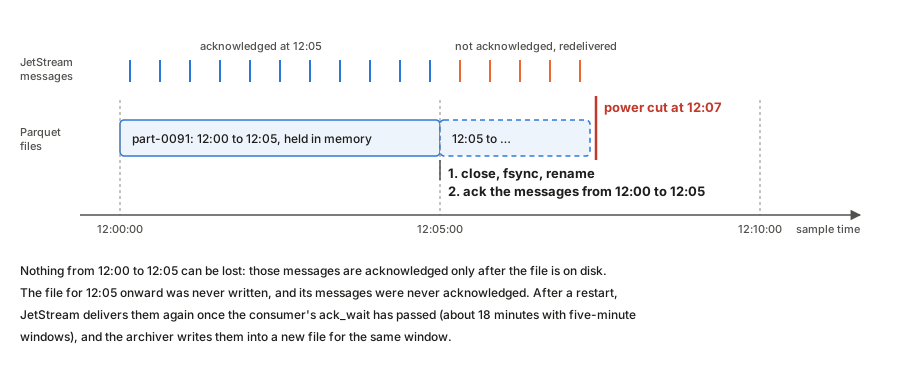
The archiver holds each window’s samples in memory and writes the whole file
when the window ends. It closes the file, syncs it and its folder to disk,
renames it from .parquet.inprogress to .parquet, and only then acknowledges
the messages it came from.
An earlier version acknowledged each message as soon as it was buffered. A crash then lost up to five minutes per channel, because the half-written file had no Parquet footer and the messages were already marked done. Acknowledging after the file is durable closes that gap: the worst a crash can do is delay the samples until JetStream delivers them again.
Two settings on the consumer make this work. ack_wait (18 minutes with
five-minute files) must be longer than a window plus the idle timeout, or
JetStream would redeliver messages that are only waiting for their file to
close. max_ack_pending (50,000) must be larger than the messages in one
window. As a safety net, the archiver closes a file early if 20,000 messages
are waiting, so the consumer can never stall on its limit whatever the sample
rate.
The cost is memory, one window of samples and messages per channel (roughly 10 to 20 MB at 2 kHz), and a rare duplicate: if the process dies after a file is renamed but before the acknowledgements are sent, those samples are written again into a second file for the same window. The exporter sends such exact copies once.
This protects data between JetStream and Parquet. JetStream itself syncs to
disk every two minutes (the default). A power cut can therefore lose up to that
much of the newest data, and can leave a consumer’s state file empty, so the
consumer starts again from the beginning of the stream. That happened on both
I-69 boxes, and the archiver wrote the whole stream a second time. The
archiver’s checkpoints (below) now stop that from creating duplicates.
sync_interval: always would stop the state loss itself, but it was tried on
both boxes and raised the SSD writes about 15 times (to 1.4–2.2 MB/s, a rated
drive life of 3–5 years), so it is not used.
A checkpoint of its own in the archiver
As a second line of defence, the archiver saves each consumer’s ack floor to a small synced file of its own and acknowledges, without writing, any message at or below it. If JetStream loses a consumer’s progress for any reason, the replay is skipped instead of archived again. The checkpoint is ignored when the stream was recreated, since sequence numbers then start over. When a channel’s subject changes, the archiver uses a new consumer named after the subject rather than editing an existing consumer’s filter: an edited consumer keeps its old delivery position, so messages on the new subject below it would be skipped.
Files cover aligned windows of sample time
A file covers :00 to :05, :05 to :10 and so on, measured by the
samples’ own timestamps rather than the clock on the wall.
Aligned windows make files line up across channels and boxes, so finding the data for a moment means opening one predictable file per channel. Using sample time rather than wall-clock time keeps the layout right when the archiver catches up on a backlog: an hour of stored messages consumed in a minute still produces twelve five-minute files, not one.
An earlier version rotated on a wall-clock timer and on sample time at the same time. The two raced, and every so often produced a file with a single message in it. There is now one rule, and a separate timer that only closes a file that has stopped receiving data.
One row group per file, compressed
Each file is a single Parquet row group with zstd compression, delta-encoded timestamps and dictionary-encoded values.
Timestamps rise by the same interval every sample, so delta encoding reduces them to almost nothing. Values come from a 16-bit converter, so a channel uses only a few hundred distinct values in five minutes, and a dictionary stores each once. Measured on a real MU1 file at 2 kHz, this is 0.5 MB instead of 6.9 MB, about 14 times smaller, with exactly the same values. At 2 kHz on four channels that is roughly 0.6 GB a day, so a 1 TB disk holds years of data.
Small row groups would not make anything safer. An unfinished file has no footer and cannot be read either way; the safety comes from the acknowledgements above.
Filters apply where data is read, not where it is stored
The per-channel noise filters run in the webapp’s live plot and, on request, in
the exporter, which adds a filtered_value column. The streamer and archiver
never see them, and the archive keeps the raw volts.
A filter setting can be wrong, and a better one can be found later; raw data
can always be filtered again, filtered data cannot be unfiltered. Keeping
filters out of the recording path also means changing them restarts nothing.
The cost is that the same pipeline exists twice, in TypeScript and Rust, and
the two are held together by shared test vectors
(testdata/filter-vectors.json). The live plot filters causally, so it can
draw as samples arrive; exports filter forward and backward, which removes the
phase shift but needs a margin of data past the end of the range.
Timestamps come from the host clock
The LabJack streams samples at a fixed rate but does not timestamp them. The streamer stamps the first read with the system clock and counts forward by the sample interval.
Two clocks are involved, and they disagree. The LabJack’s crystal and the system clock drift apart by a few parts per million, which added up to 4 to 5 seconds over one 26-day run. The streamer therefore compares its timeline with the system clock and corrects it.
The first version of that correction jumped the timeline by the full offset seen in each minute. On an idle box that was fine. On MU1, with the camera software loading the CPU, the time a read took to arrive wandered by tens to hundreds of milliseconds, and the correction chased it, stepping timestamps by up to 430 ms every minute. The current version separates drift from latency:
- It uses the fastest read over the last 15 minutes as the offset, because on a busy host a whole minute can pass without a fast read, while drift moves the offset by under 2 ms in that time.
- It acts only when the offset points the same way twice in a row, and then nudges the timeline by at most 1 ms a minute (less at high sample rates), so timestamps never go backwards.
- It jumps only for a system clock step of 2 seconds or more that lasts three minutes, and once after the first minute of a run to correct the initial anchor, which otherwise carries whatever delay the very first read had.
The tests replay the latency pattern measured on MU1, steady drift, 2 kHz sampling and a clock step, and check that timestamps stay within a few milliseconds of the truth.
This makes the timestamps exactly as good as the system clock, which is why
the setup guide insists on a synchronized chronyd. A box with a broken NTP
configuration records correct samples with wrong times, and nothing else
notices.
One source of truth for configuration
What to record lives in one document in the central key-value bucket. The webapp edits it there, and each streamer mirrors its own key into the box’s local bucket and follows the local copy.
Central editing means no one logs in to a box to change a sample rate. The local mirror means a box that restarts while central NATS is unreachable still knows what to record. The box profile in the repository only seeds the first copy; after that it is not read, which avoids two places disagreeing.
Exports travel over NATS
The exporter subscribes to a request subject instead of serving HTTP. The webapp already holds a NATS connection to central, and central already reaches every box over its leaf link, so exports need no extra port, address or tunnel. The subject contains the box’s identity, so a request reaches exactly one exporter.
Core NATS has no flow control, so the exporter waits for the client to acknowledge every eight chunks. A slow connection then slows the export down instead of dropping chunks. The same ack subject carries a cancel message, so a client that gives up stops the exporter before its next chunk.
The exporter reads only the row groups whose timestamp range overlaps the request, reads the two columns directly rather than row by row, and formats the date part of each timestamp once per second rather than once per row. Together that made producing an export about three times faster; over the network, where transfer time dominates, downloads finished about twice as fast.
The streamer gives up after five failures
If the LabJack fails five times in a row, the streamer exits with a success status, and systemd, which restarts only on failure, leaves it stopped.
A LabJack that is unplugged or unpowered will not come back by being retried
every few seconds for days, and the retries fill the journal. Stopping makes
the fault visible in systemctl and in the health metrics, and someone
restarts the service once the hardware is fixed.
Noise on the I-69 sensor inputs
What the I-69 records carry besides the sensor signal, where each part comes from, and what signal processing can and cannot remove. Measured on MU1 and MU2 in September 2026 (2 kHz, 2.2 kHz and 2.5 kHz records, the 100 Hz archive, and a bench test with the streamer stopped). The full analysis is in the strain follow-up report that accompanies the escalation note.
Sources
| # | Noise | Cause | Can a filter remove it? |
|---|---|---|---|
| 1 | 10 Hz square wave: ±8 mV on MU1’s pressure cells, about 3 mV on the strain gauges | Runs off the LabJack T7’s own clock (it stays fixed against the sample count and drifts against UTC at the T7 crystal’s 2 ppm) but enters on the sensor wiring: the T7’s internal ground and unused inputs are clean. Suspects: a T7 DAC or digital output, the VS (5 V) terminal feeding a sensor board, or a 10 Hz load in the T7 disturbing a shared supply or ground. | Yes. Subtract a template of the 100 ms cycle, aligned on the sample count and rebuilt after each stream start: 27–35 dB. Notch filters do worse and damage vehicle pulses. |
| 2 | Broadband noise that doubles during one half of every 100 ms cycle | The same 10 Hz source switching something on and off | No, it is random. Detection can use only the quiet half of each cycle. |
| 3 | 11.9 Hz square wave (lines at 11.906, 35.72 and 59.53 Hz) | A second periodic source on the wiring, also on the T7 clock | Yes. A second template at its own period, or a narrow comb notch. |
| 4 | 1.9 Hz line on all channels | The beat between sources 1 and 3 (11.906 − 10) | Mostly. It fades once 1 and 3 are removed; a 1–2 Hz high-pass removes the rest without touching axle pulses. |
| 5 | One-sample positive spikes on the strain gauges: about 160 a second at 2 kHz, 15–30 µε, one sample wide at every rate | A very fast switching disturbance caught by about one reading in ten | Yes, but not with a linear filter. A 2.5 ms running minimum followed by a running maximum strips them and keeps 12 ms axle pulses: SG194 noise falls from 1.13 to 0.34 µε (0.22 in 2020). |
| 6 | Broad bump near 430 Hz and a hump near 870 Hz, strongest on PC3517 | A switching regulator near 30.4 kHz (and its 2nd harmonic), folded into the record because the T7 has no anti-aliasing filter in stream mode | Yes in practice: they sit above the vehicle band, so a 100 Hz low-pass removes them. |
| 7 | A peak wandering between 110 and 190 Hz | Aliased from about 22 kHz | Partly: a 100 Hz low-pass takes most of it, but it wanders near the band edge. |
| 8 | Broadband high-frequency noise folded into 0–100 Hz | The same missing anti-aliasing filter | No. Once folded in-band it cannot be told apart from signal. Only an analogue RC low-pass before the T7 fixes it. |
| 9 | Daily drift of 50–90 µε on the strain gauges | The pavement warming and cooling (real strain, not noise) | Yes for traffic work: a high-pass above about 0.5 Hz. Keep it for temperature studies. |
| — | Pressure cells at about 3.7 V; PC3517 open | Excitation or wiring fault at the box or sensor | Nothing to filter; there is no signal. |
Recommended cleanup for the strain gauges
- Strip the one-sample spikes (running minimum then maximum over 2.5 ms).
- Subtract the 10 Hz and 11.9 Hz templates.
- Band-pass 1–100 Hz (zero phase for stored data).
- For detection, search only the quiet half of each 100 ms cycle.
This brings SG194 to about 1.5 times its 2020 noise level. What remains is mostly items 2 and 8, which need hardware changes.
Steps 1 to 3 can be switched on per channel in the box configuration (filters,
see LabJack configuration). They apply to the
live plots and, on request, to an extra column of exports; the archive keeps the
raw readings.
Hardware fixes, in order of value
- Find and remove the T7-clocked 10 Hz source: check what is connected to the T7’s VS, DAC and digital-output terminals, and power one sensor board from a separate battery or linear supply while recording.
- Fit an RC low-pass (about 500 Hz to 1 kHz) on each input before the T7.
- Trace the switching sources near 30 kHz and 22 kHz.