Design notes
These notes explain why the system is built the way it is, for anyone changing it. Each section states the choice, the reason, and what it costs.
A NATS server on every edge node
Each edge node runs its own NATS server with JetStream, joined to central NATS as a leaf node, instead of the services talking to central NATS directly.
The roadside network drops out. With a local server, the streamer always has somewhere to publish, the archiver keeps reading from the local stream, and recording carries on through an outage of any length. When the link comes back, the live subjects flow to central again without anyone doing anything. The leaf connection is opened from the box outward, so the box needs no public address and no inbound firewall rule, and one connection carries both live data and exports.
The cost is one more server per box to install and monitor, and a JetStream store on the box’s disk.
Samples go through JetStream before they reach Parquet
The streamer never writes files. It publishes to a JetStream stream, and the archiver consumes from it.
This separates the part that must never stall (reading the LabJack, whose buffer overflows if it is not read in time) from the part that can (writing to disk). It also gives the archiver something to retry from: a message stays in the stream until the archiver acknowledges it, so an archiver crash or restart loses nothing.
Acknowledge only after the file is on disk
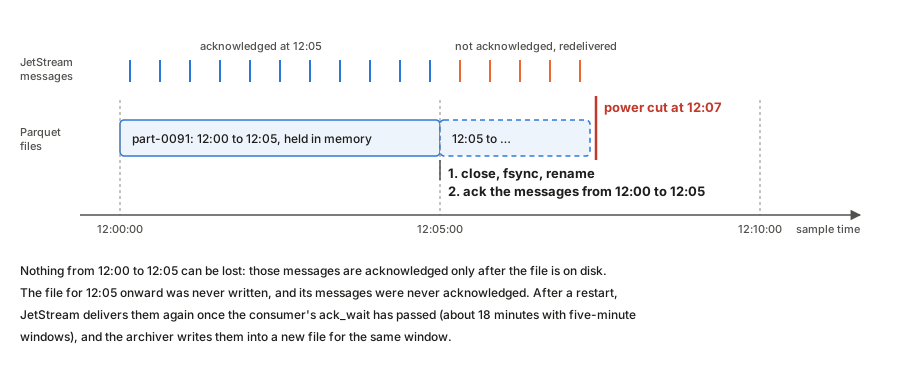
The archiver holds each window’s samples in memory and writes the whole file
when the window ends. It closes the file, syncs it and its folder to disk,
renames it from .parquet.inprogress to .parquet, and only then acknowledges
the messages it came from.
An earlier version acknowledged each message as soon as it was buffered. A crash then lost up to five minutes per channel, because the half-written file had no Parquet footer and the messages were already marked done. Acknowledging after the file is durable closes that gap: the worst a crash can do is delay the samples until JetStream delivers them again.
Two settings on the consumer make this work. ack_wait (18 minutes with
five-minute files) must be longer than a window plus the idle timeout, or
JetStream would redeliver messages that are only waiting for their file to
close. max_ack_pending (50,000) must be larger than the messages in one
window. As a safety net, the archiver closes a file early if 20,000 messages
are waiting, so the consumer can never stall on its limit whatever the sample
rate.
The cost is memory, one window of samples and messages per channel (roughly 10 to 20 MB at 2 kHz), and a rare duplicate: if the process dies after a file is renamed but before the acknowledgements are sent, those samples are written again into a second file for the same window. The exporter sends such exact copies once.
This protects data between JetStream and Parquet. JetStream itself syncs to
disk every two minutes (the default). A power cut can therefore lose up to that
much of the newest data, and can leave a consumer’s state file empty, so the
consumer starts again from the beginning of the stream. That happened on both
I-69 boxes, and the archiver wrote the whole stream a second time. The
archiver’s checkpoints (below) now stop that from creating duplicates.
sync_interval: always would stop the state loss itself, but it was tried on
both boxes and raised the SSD writes about 15 times (to 1.4–2.2 MB/s, a rated
drive life of 3–5 years), so it is not used.
A checkpoint of its own in the archiver
As a second line of defence, the archiver saves each consumer’s ack floor to a small synced file of its own and acknowledges, without writing, any message at or below it. If JetStream loses a consumer’s progress for any reason, the replay is skipped instead of archived again. The checkpoint is ignored when the stream was recreated, since sequence numbers then start over. When a channel’s subject changes, the archiver uses a new consumer named after the subject rather than editing an existing consumer’s filter: an edited consumer keeps its old delivery position, so messages on the new subject below it would be skipped.
Files cover aligned windows of sample time
A file covers :00 to :05, :05 to :10 and so on, measured by the
samples’ own timestamps rather than the clock on the wall.
Aligned windows make files line up across channels and boxes, so finding the data for a moment means opening one predictable file per channel. Using sample time rather than wall-clock time keeps the layout right when the archiver catches up on a backlog: an hour of stored messages consumed in a minute still produces twelve five-minute files, not one.
An earlier version rotated on a wall-clock timer and on sample time at the same time. The two raced, and every so often produced a file with a single message in it. There is now one rule, and a separate timer that only closes a file that has stopped receiving data.
One row group per file, compressed
Each file is a single Parquet row group with zstd compression, delta-encoded timestamps and dictionary-encoded values.
Timestamps rise by the same interval every sample, so delta encoding reduces them to almost nothing. Values come from a 16-bit converter, so a channel uses only a few hundred distinct values in five minutes, and a dictionary stores each once. Measured on a real MU1 file at 2 kHz, this is 0.5 MB instead of 6.9 MB, about 14 times smaller, with exactly the same values. At 2 kHz on four channels that is roughly 0.6 GB a day, so a 1 TB disk holds years of data.
Small row groups would not make anything safer. An unfinished file has no footer and cannot be read either way; the safety comes from the acknowledgements above.
Filters apply where data is read, not where it is stored
The per-channel noise filters run in the webapp’s live plot and, on request, in
the exporter, which adds a filtered_value column. The streamer and archiver
never see them, and the archive keeps the raw volts.
A filter setting can be wrong, and a better one can be found later; raw data
can always be filtered again, filtered data cannot be unfiltered. Keeping
filters out of the recording path also means changing them restarts nothing.
The cost is that the same pipeline exists twice, in TypeScript and Rust, and
the two are held together by shared test vectors
(testdata/filter-vectors.json). The live plot filters causally, so it can
draw as samples arrive; exports filter forward and backward, which removes the
phase shift but needs a margin of data past the end of the range.
Timestamps come from the host clock
The LabJack streams samples at a fixed rate but does not timestamp them. The streamer stamps the first read with the system clock and counts forward by the sample interval.
Two clocks are involved, and they disagree. The LabJack’s crystal and the system clock drift apart by a few parts per million, which added up to 4 to 5 seconds over one 26-day run. The streamer therefore compares its timeline with the system clock and corrects it.
The first version of that correction jumped the timeline by the full offset seen in each minute. On an idle box that was fine. On MU1, with the camera software loading the CPU, the time a read took to arrive wandered by tens to hundreds of milliseconds, and the correction chased it, stepping timestamps by up to 430 ms every minute. The current version separates drift from latency:
- It uses the fastest read over the last 15 minutes as the offset, because on a busy host a whole minute can pass without a fast read, while drift moves the offset by under 2 ms in that time.
- It acts only when the offset points the same way twice in a row, and then nudges the timeline by at most 1 ms a minute (less at high sample rates), so timestamps never go backwards.
- It jumps only for a system clock step of 2 seconds or more that lasts three minutes, and once after the first minute of a run to correct the initial anchor, which otherwise carries whatever delay the very first read had.
The tests replay the latency pattern measured on MU1, steady drift, 2 kHz sampling and a clock step, and check that timestamps stay within a few milliseconds of the truth.
This makes the timestamps exactly as good as the system clock, which is why
the setup guide insists on a synchronized chronyd. A box with a broken NTP
configuration records correct samples with wrong times, and nothing else
notices.
One source of truth for configuration
What to record lives in one document in the central key-value bucket. The webapp edits it there, and each streamer mirrors its own key into the box’s local bucket and follows the local copy.
Central editing means no one logs in to a box to change a sample rate. The local mirror means a box that restarts while central NATS is unreachable still knows what to record. The box profile in the repository only seeds the first copy; after that it is not read, which avoids two places disagreeing.
Exports travel over NATS
The exporter subscribes to a request subject instead of serving HTTP. The webapp already holds a NATS connection to central, and central already reaches every box over its leaf link, so exports need no extra port, address or tunnel. The subject contains the box’s identity, so a request reaches exactly one exporter.
Core NATS has no flow control, so the exporter waits for the client to acknowledge every eight chunks. A slow connection then slows the export down instead of dropping chunks. The same ack subject carries a cancel message, so a client that gives up stops the exporter before its next chunk.
The exporter reads only the row groups whose timestamp range overlaps the request, reads the two columns directly rather than row by row, and formats the date part of each timestamp once per second rather than once per row. Together that made producing an export about three times faster; over the network, where transfer time dominates, downloads finished about twice as fast.
The streamer gives up after five failures
If the LabJack fails five times in a row, the streamer exits with a success status, and systemd, which restarts only on failure, leaves it stopped.
A LabJack that is unplugged or unpowered will not come back by being retried
every few seconds for days, and the retries fill the journal. Stopping makes
the fault visible in systemctl and in the health metrics, and someone
restarts the service once the hardware is fixed.